
The Best AI Alan Wake Key Visual Generator — Psychological Horror Covers from One Prompt
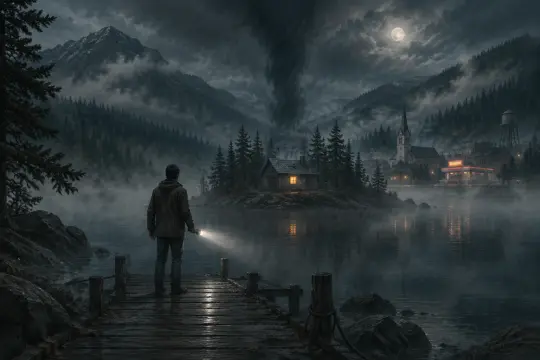
Generate cinematic Alan Wake-style psychological horror key visuals from one prompt with GPT Image 2 and Krea 2, using a real Neta Studio world and four published works as the example.
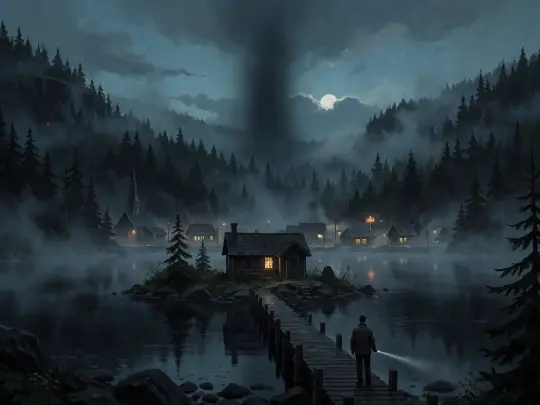
Create Alan Wake-Style Key Visuals in Minutes
Turn one sentence about a lake that makes stories real, a diner that never closes, or a writer with a flashlight into a cinematic psychological-horror key visual — no concept team, no location scout.
What Is an AI Alan Wake Key Visual Generator?
An AI Alan Wake key visual generator is a text-to-image pipeline that renders cinematic psychological-horror covers for a small-town supernatural thriller: the kind of frame that sells a whole world in one image — a wet road, a lit diner, a black lake, a flashlight beam that is the only thing standing between the hero and the trees. It is not a filter and not a single lucky render. It is a world with atoms, a fixed palette, and two models pointed at the same brief, so the cover you get on Monday still belongs to the world you publish on Friday.
Why Psychological Horror Key Visuals Matter
- Cover power — horror sells dread in one second; a key visual does it with a lit window, a dark treeline, and a very small figure.
- On-canon consistency — the same palette (wet charcoal, teal night, one amber lamp, one red flare) makes a storefront, a thumbnail, and a location card read as one world.
- Iteration speed — a two-model comparison gives you a detail-first and an atmosphere-first answer before lunch.
- Forkability — every image stays attached to the world it came from, so a cover can become a game, a video, or a background without starting over.
A key visual is rarely the end — it is the cover. The same Alan Wake-style posters that sell the world on a banner can be forked into a game cover, a video thumbnail, a location card, or a streaming capsule, because every render stays attached to the world it came from. That is the difference between generating an image and building a visual system.
How It Works on Neta Studio
Fork the world, open the studio board, and generate from the world seed. The world supplies the cast, the places, and the palette; the prompt supplies the moment. Two models run the same prompt, and both results publish as works of the world — not as orphan files. From there you can compare, re-prompt, or fork again.
- Fork the Alan Wake: Bright Falls world and inherit 24 atoms.
- Pick a subject and a beat from the atom cards.
- Prompt one scene in plain language, with light and palette.
- Render the same prompt through GPT Image 2 and Krea 2.
- Publish both as works; compare and keep the one your cover needs.
The World Seed: Alan Wake: Bright Falls
Bright Falls is a logging town of nine hundred on the edge of a volcanic lake in the Pacific Northwest. The lake makes creative work real, and the thing at the bottom edits it toward horror. Alan Wake, a crime novelist, has been trapped in the Dark Place since 2010, writing drafts that open doors for him and close them on other people. Around him: Alice, his photographer wife, who came back changed; Barry, his agent, holding a flare gun; Sarah Breaker, the sheriff who looks directly at the lake; Rose, who keeps the diner lit; Thomas Zane, a drowned poet who helped write the rules. That gives a prompt a fixed visual vocabulary: wet charcoal and teal night, practical amber lamps, one hard flashlight beam, red flares, pine trees, and a town that is always slightly too quiet.
From Brief to Key Visual in Five Steps
Choose the scene
Cauldron Lake at dusk, the diner after closing, the fog road into Elderwood, the cabin on Diver’s Isle, or Deerfest under the bunting.
Cast the subject
Name the character and the beat — Alan on the pier, Sarah with a flare, Rose in the doorway, the Taken stepping out of the trees.
Set the mood
State the light and palette — one warm window against wet charcoal, a hard white flashlight beam, red flare light on asphalt.
Render both models
Run the same prompt through GPT Image 2 and Krea 2; the studio publishes both as works.
Iterate
Compare, re-prompt, or fork the world and start again — every cover is a fork point.
Real Outputs from a Real World
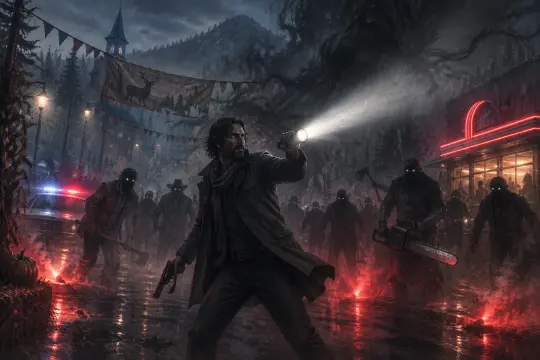
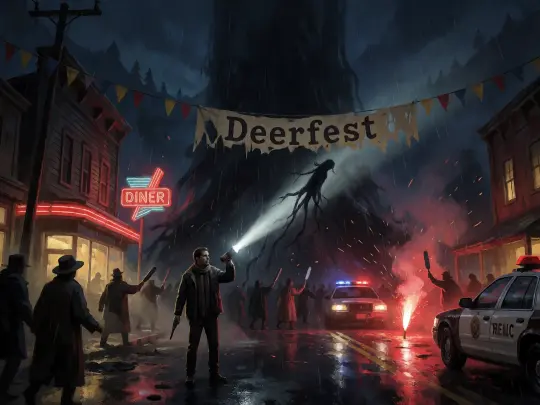
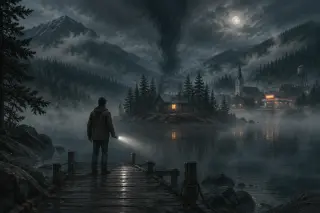
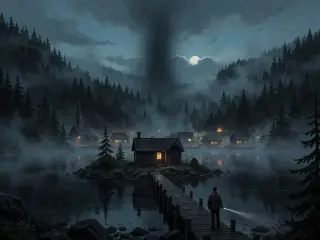
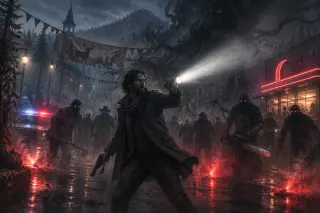
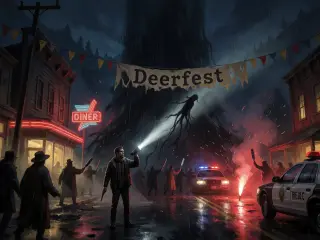
Four key visuals were generated from the Alan Wake: Bright Falls world — two briefs, two models, published as four works. The world key visual asks for Cauldron Lake at dusk, from the pier and the flashlight to the lit cabin, the town steeple and the column of darkness in the sky. The event key visual asks for Deerfest night, with Alan in the rain, the Taken closing in, and the diner neon burning behind. Both briefs were run through GPT Image 2 and Krea 2 with no changes to the prompt between models, which is what makes the comparison honest.
A Closer Look: The Deerfest Pair
The Deerfest pair is the harder brief and the better test. GPT Image 2 builds the scene: Alan mid-stride with the flashlight up and the revolver down, the Taken emerging from the rain in layers, the cruiser’s light bar smeared across the asphalt, the diner glowing. Krea 2 turns the same brief into a poster: the torn festival banner overhead, a single towering shadow figure at the end of the beam, the crowd reduced to silhouettes and torches. The first is a moment you walk into; the second is a memory you carry out.
GPT Image 2 vs Krea 2 — Which Should You Use?
GPT Image 2 for cover-ready detail: separated value planes, legible landmarks, rain and lamplight that survive a long look, and enough texture to read as a film still. Krea 2 for a poster that has to work at thumbnail size: cleaner silhouettes, flatter values, and a composition that reads in one second. A practical rule: use GPT Image 2 for the key visual that lives on a storefront, and Krea 2 for the version that lives in a social feed.
Prompts That Work
- Name the frame — “a wide establishing shot from the end of a pier”, “a street-level action frame”, “an empty diner interior at 2 a.m.”.
- Give one strong light — “a hard white flashlight beam cutting into fog”, “one warm window across black water”, “red flares on wet asphalt”.
- Anchor the palette — “wet charcoal, teal night, one amber lamp, one violent red”, and keep the contrast high.
- Stage a small figure — a lone writer on a pier gives scale and isolation; a crowd of shadow-faced figures gives the frame its threat.
- Close the door on text — end with “no text, no watermark, no logo”.
Beyond the Poster
The key visuals published from this world are works — but the world behind them is the actual asset. The same diner neon can light a game cover, a video thumbnail, a location card, or a scene background. Because the world holds the atoms, a new render does not have to rediscover the palette or the cast; it inherits them.
Who Is It For?
Indie horror teams that need a cover before the art pipeline exists. World-builders who want a canon-consistent look for a campaign. Writers who need a visual pitch for a quiet, damp, literary thriller. Solo creators who want a detail-first and an atmosphere-first option from the same prompt. And anyone who has ever wanted to see what is at the bottom of the lake.
Limitations to Know
GPT Image 2 is slower than lightweight models and favors detail over speed. Krea 2 is faster and cleaner but will simplify faces, hands, and small props, and it can render short text imperfectly. Neither model knows the source games’ canon, so the world seed has to carry the names, palette, and rules. And a key visual is still a cover: it sells the world, it does not replace the world-building behind it.
Frequently Asked Questions
- Do I need to know Alan Wake to use this? No. The world seed explains the town, the lake, the palette, and the cast; the prompt only needs a scene.
- Can I use the outputs commercially? The works here are published public works of a public world; fork the world and generate your own version for production.
- Why run two models? Because a cover and a feed image are different jobs, and the comparison shows both answers from one prompt.
- How much lore do I need? None to start — one sentence about a lake town and one flashlight is enough for a first render.
Start Creating
Fork Alan Wake: Bright Falls or start from your own one-sentence psychological-horror brief. The world ships with its 24 atoms, its overcast film-still palette, and four published key visuals — your cover is one prompt away.
Start Creating
Two models, one world, a cinematic horror cover in minutes — rendered, published, and remixable.