The Best AI Bendy-Style Cartoon Horror Key Visual Generator — 1930s Rubber-Hose Covers from One Prompt
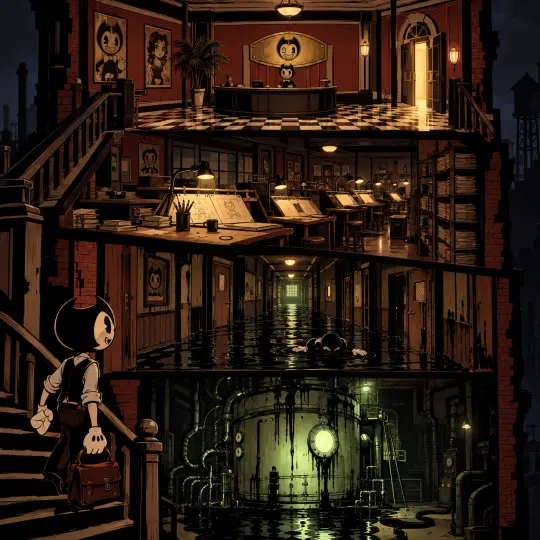
Generate 1930s rubber-hose cartoon horror key visuals from one prompt with GPT Image 2 and Krea 2, using a real Neta Studio world and four published works as the example.
Create Ink-Black Cartoon Key Visuals in Minutes
Turn one sentence about a cartoon studio that built a machine to make its drawings real into a 1930s rubber-hose key visual with the lights still on — no concept team, no asset hunt.
What Is an AI Bendy-Style Cartoon Horror Key Visual Generator?
It is a text-to-image pipeline that renders a 1930s rubber-hose cartoon frame — pie-cut eyes, crescent mouths, noodle limbs, white gloves, bold fluid outlines, flat cream-and-black fills — and then pushes that frame into dread without changing the drawing style. The cartoon never becomes photoreal and never becomes gore. It stays a cartoon, lit badly, in a room that has been underwater for sixty years. That constraint is the whole aesthetic, and it is what makes these images read as a place rather than a monster.
Why Ink-Black Cartoon Key Visuals Work
- Familiar vocabulary, wrong room — everyone alive has seen a rubber-hose cartoon. Putting that vocabulary in a flooded basement does the work of a hundred horror set-pieces in one glance.
- Flat fills hold at any size — cream, black and brick red occupy big separated shapes, so a key visual stays legible as a storefront capsule, a thumbnail, a stream overlay or a poster.
- One colour can carry the whole mood — introduce a single sickly ink-green and every cream surface in the frame instantly reads as damp.
- No gore required — the fear is architectural. Corridors, pressure gauges and an open door do more than any amount of red.
A key visual is rarely the end product: it is the cover, the capsule, the pitch frame, the header on the page you are reading. That means it has to survive being small. Rubber-hose linework is unusually good at this, because the silhouette is the joke and the silhouette is the threat — a round head with two horns reads as both at forty pixels wide.
How It Works on Neta Studio
Fork the world, open the studio board, and generate from the world seed instead of from a blank prompt. The world already carries the characters, the five locations, the timeline, the four factions and the rules of the ink, so the model is not inventing a setting from scratch — it is rendering one that already exists. The same four works you see on this page were produced this way in a single session.
- Fork the Bendy and the Ink Machine world and inherit all 20 atoms.
- Pick a subject and a beat from the world cards — the lobby, the drafting floor, the flooded halls, the tank room.
- Write one paragraph of prompt: scene, subject, light, palette, and the style sentence.
- Render the identical prompt on GPT Image 2 and Krea 2.
- Publish both as works of the world, then compare them at full size and at thumbnail size.
The World Seed: Bendy and the Ink Machine
Joey Drew Studios was built on a simple bargain: draw something beloved, sell it cheap, keep the doors open. Its star was Bendy, a grinning little devil in a bow tie. Founder Joey Drew wanted more than drawings — he built a machine in the basement to make the cartoons walk — and now the studio is a flooded maze of drafting tables, recording booths and ink where everyone who ever worked is still on the payroll. Henry Stein, the animator who walked out in 1946, has been invited back by a letter he cannot explain. The halls remember him. So does the ink.
From Brief to Key Visual in Five Steps
Name the frame
Decide whether you are selling a place (a cutaway of the whole studio) or a moment (the machine opening). Do not try to do both.
Place the subject
Put one figure in the frame and make them small. Scale is how a studio reads as a trap instead of a set.
Choose one light
One warm work-lamp, one open door, or one green porthole. Everything else falls into the dark.
Write the style sentence last
It is the anchor: “1930s rubber-hose cartoon illustration, bold fluid black outlines, pie-cut eyes, flat vintage animation fills, black, bone cream and muted brick red.”
Render both models
Same prompt, GPT Image 2 and Krea 2. Publish both, then pick by where the image will live, not by which one you like in isolation.
Real Outputs from a Real World
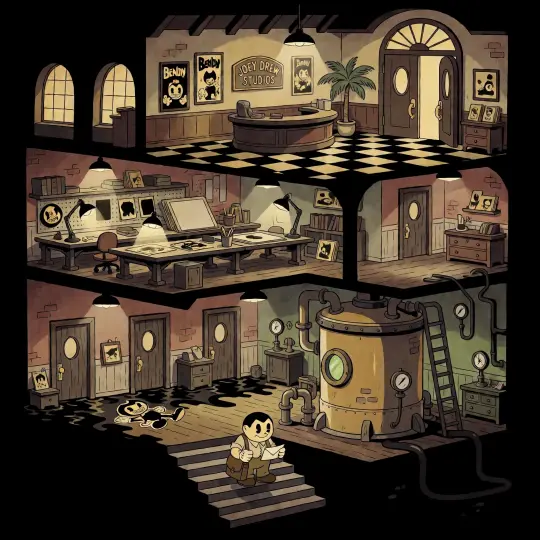
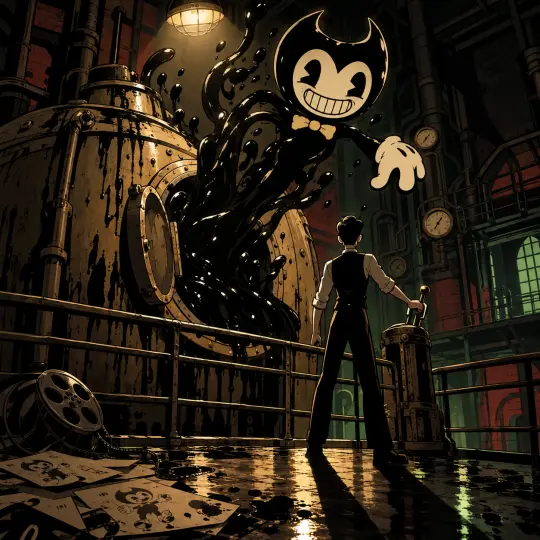
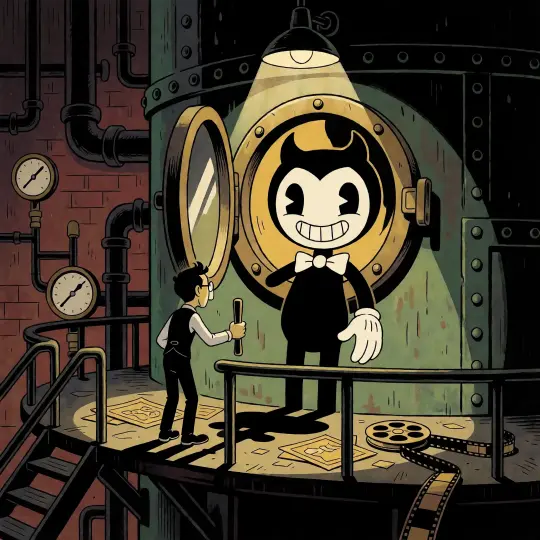
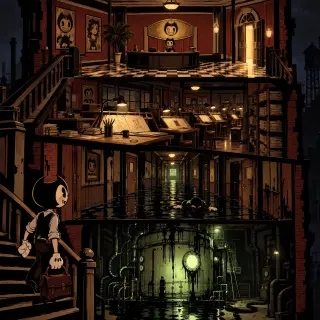
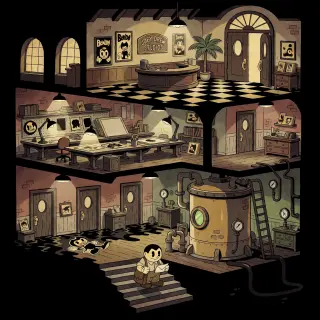
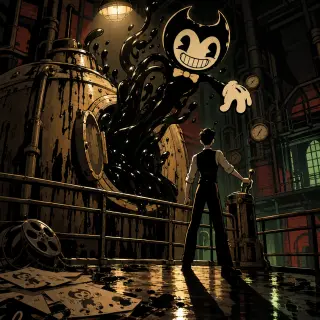
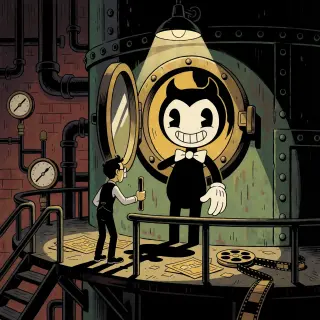
Four key visuals were generated from the Bendy world — two briefs, two models, one prompt per brief. The world pair is a full cutaway of Joey Drew Studios; the event pair is the instant the Ink Machine is switched on. Nothing here is a mock-up: each image is a published work with its own share page, generated in this world’s palette and style.
A Closer Look: The Machine Pair
The event brief is the better test of a generator, because it has to hold three legible things at once: a machine, a monster and a man. GPT Image 2 renders the tank as real mass — rivets, bands, wet sheen, ink with volume — and lets Bendy be enormous and half-formed, so the horror is in the unfinished neck. Krea 2 turns the open hatch into a proscenium and Bendy into a fully formed vaudeville entrance, with Joey reduced to a small silhouette at the lever. GPT Image 2 is a frame from the film; Krea 2 is the poster outside the theatre.
GPT Image 2 vs Krea 2 — Which Should You Use?
GPT Image 2 for cover-ready detail: separated value planes, legible gauges and drafting tables, real specular highlights on wet ink, and a light logic you can follow from floor to floor. It is slower and costs more, and it will happily fill a frame with props if you let it. Krea 2 for speed and thumbnail clarity: warmer, flatter, more graphic, less literal, around a tenth of the cost. Use GPT Image 2 for the hero cover and the world cutaway. Use Krea 2 for avatars, banner crops, social cards, and the twenty exploratory frames you need before you know what the cover is.
Prompts That Work
- Name the frame — “a single vertical cross-section of a 1930s animation studio, stacked like a cutaway dollhouse”, “the moment the porthole swings open”.
- Name the props that imply a business — peg bars, stacked cels, a pencil cup, a coffee ring, a brass plaque, a potted palm, pressure gauges, a work ladder. Props are the difference between a studio and a basement.
- Set the ink as a material — “glossy black ink beaded on riveted iron”, “ankle-deep ink reflecting the ceiling lights twice”, “ink running down the shell into a black pool”.
- Close with the style sentence, verbatim — 1930s rubber-hose cartoon illustration, bold fluid black outlines, pie-cut eyes, crescent mouths, noodle limbs, white gloves, flat vintage animation fills, black, bone cream and muted brick red, one sickly ink-green glow, no text, no watermark, no logo.
Beyond the Poster
The images published from this world are works, but the world behind them is the actual asset. The same lobby becomes a game level, a five-second loop of ink rising in the tank, a character cover for Alice, a title card for a tabletop session. Because the atoms are fixed, every derivative stays recognisably the same building — which is what a studio needs and what a prompt library can never give you.
Who Is It For?
Indie horror teams that need a storefront capsule before the art pipeline exists. Solo creators building a cartoon-horror series and needing a consistent look across twelve thumbnails. Game masters who want a building with a clock on it. Tabletop designers who need a map that also works as an illustration. And artists who want to explore rubber-hose composition without redrawing every cel by hand.
Limitations to Know
GPT Image 2 is slow and comparatively expensive, and it will add props you did not ask for — check the frame for stray signage before you publish. Krea 2 is fast and cheap but weak at legible text, so do not build a cover around a sign; if a plaque or a poster needs words, put them there in post or let GPT Image 2 handle that frame. Both models will happily drift toward photorealism if the style sentence is buried; keep it at the end of the prompt where it does the most work. And neither model knows the official characters, so describe the shape you want rather than naming a franchise.
Frequently Asked Questions
- Do I need to know Bendy and the Ink Machine to use this? No. The world seed explains the whole setting, and the prompts describe shapes and rooms rather than referencing a franchise.
- Is this an official generator? No. It is a Neta Studio workflow built on an AI-generated, fan-style world. It is not affiliated with or endorsed by the rights holders.
- How long does a render take? Krea 2 returns in seconds; GPT Image 2 takes noticeably longer and costs more per image. Run Krea 2 first when you are still exploring.
- Can I sell what I make? The images are yours to publish and remix as works of this world; check the platform terms and keep the fan-style framing in mind if you commercialise.
- Why do all four examples share a palette? Because the world fixes the palette — black, bone cream, muted brick red, one ink-green. Consistency comes from the world, not from the prompt.
Start Creating
Fork Bendy and the Ink Machine or start from your own one-sentence cartoon-horror brief. The world ships with its 20 atoms, its rubber-hose palette and four published key visuals — enough reference to keep a whole series on-model.
Create from This World
Two models, one world, an ink-black cartoon cover in minutes — rendered, published, and remixable.