The Best AI Monster Hunter Key Visual Generator — Titan-Hunting Dark Fantasy Covers from One Prompt
Generate painterly Monster Hunter-style dark fantasy key visuals from one prompt with GPT Image 2 and Krea 2, using a real Neta Studio world and four published works as the example.
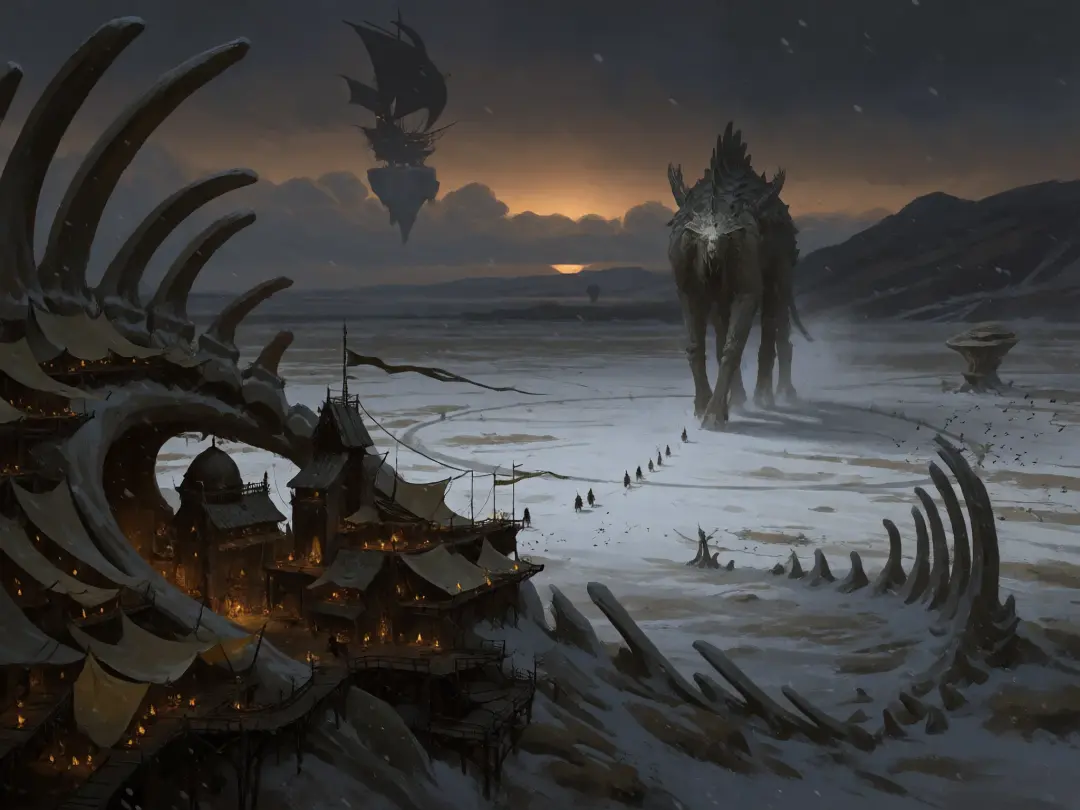
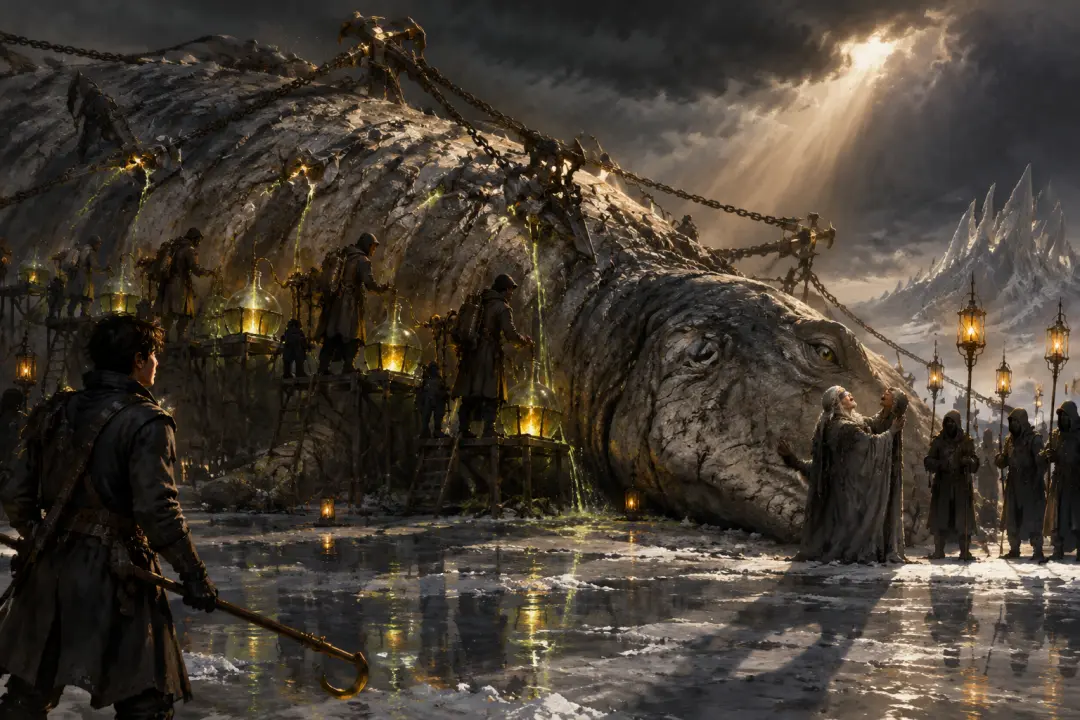
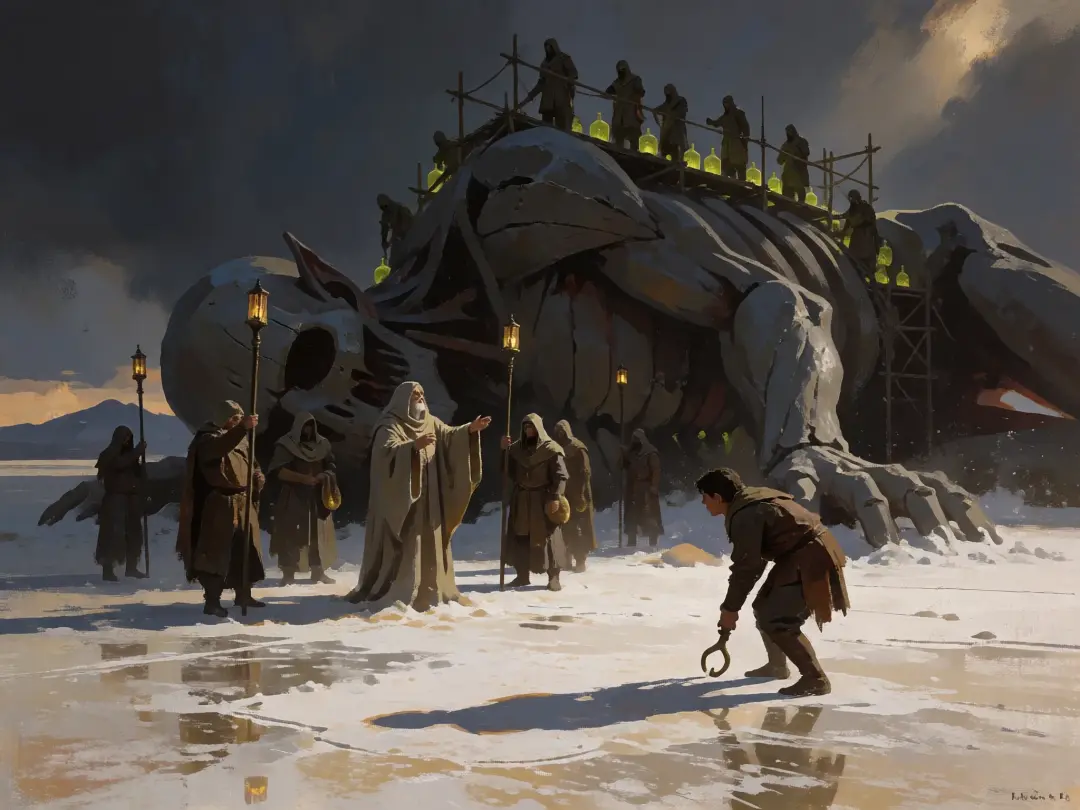
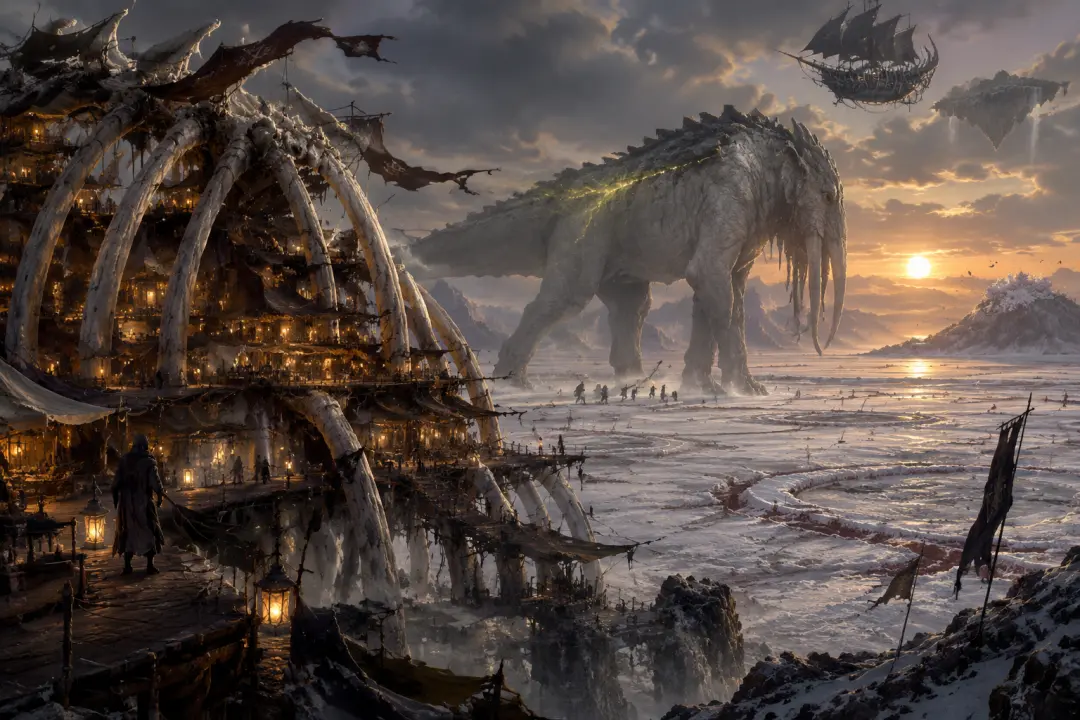
Create Titan-Hunting Key Visuals in Minutes
Turn one sentence about a ribcage city, a living god-beast, or a blood rite on a salt flat into a painterly dark-fantasy key visual — no concept team, no asset hunt.
What Is an AI Monster Hunter Key Visual Generator?
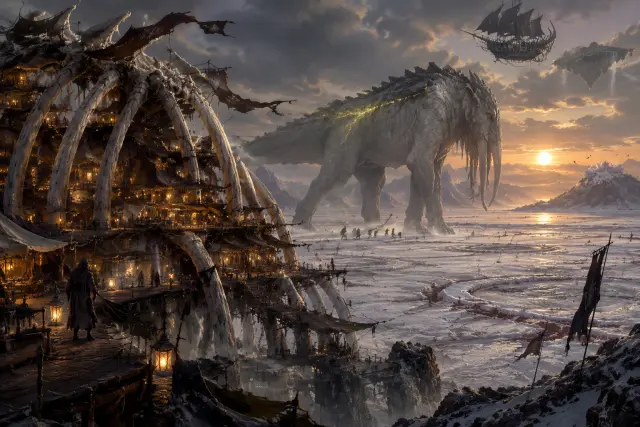
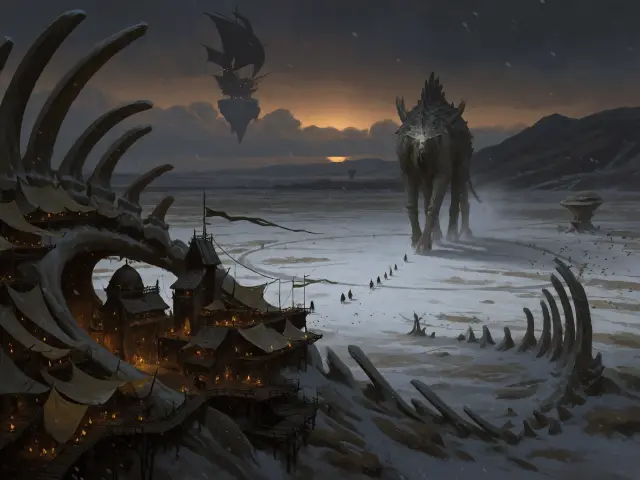
An AI Monster Hunter key visual generator is a text-to-image pipeline that renders painterly dark-fantasy covers for a titan-hunting frontier: the kind of frame that sells a whole world in one image — a fortress built inside a monster’s ribcage, a god-beast crossing a salt flat, hunters small enough to be mistaken for insects. It is not a filter and not a single lucky render. It is a world with atoms, a fixed palette, and two models pointed at the same brief, so the cover you get on Monday still belongs to the world you publish on Friday.
Why Titan-Hunting Key Visuals Matter
- Scale in one second — the genre sells the feeling of standing next to something that could flatten a town; a key visual has to deliver that before a caption does.
- On-canon consistency — the same palette (ash grey, bone, umber, one amber-green) makes a storefront, a thumbnail, and a location card read as one world.
- Iteration speed — a two-model comparison gives you a detail-first and an atmosphere-first answer before lunch.
- Forkability — every image stays attached to the world it came from, so a cover can become a game, a video, or a background without starting over.
A key visual is rarely the end — it is the cover. The same titan-hunting posters that sell the world on a banner can be forked into a game cover, a video thumbnail, a location card, or a storefront capsule, because every render stays attached to the world it came from. That is the difference between generating an image and building a visual system.
How It Works on Neta Studio
Fork the world, open the studio board, and generate from the world seed. The world supplies the cast, the places, and the palette; the prompt supplies the moment. Two models run the same prompt, and both results publish as works of the world — not as orphan files. From there you can compare, re-prompt, or fork again.
- Fork The Ichorfall Marches and inherit 27 atoms.
- Pick a subject and a beat from the atom cards.
- Prompt one scene in plain language, with light and palette.
- Render the same prompt through GPT Image 2 and Krea 2.
- Publish both as works; compare and keep the one your cover needs.
The World Seed: The Ichorfall Marches
The Ichorfall Marches is a frontier that has been farmed for blood for nine centuries. The colossi — titans tall as cathedral ridges — carry a luminous resin called ichor, the only fuel that lifts iron into the sky and turns a lamp into a small sun. Ichor curdles the instant its host dies, so the Hunters’ Guild does not kill monsters: it tracks them, sings them down, pins them with harpoon-brakes, and milks them alive in a rite called the Giving. That gives a prompt a fixed visual vocabulary: bone architecture, oiled canvas, ash and salt, a single amber-green light, and a creature that must survive the picture.
From Brief to Key Visual in Five Steps
Choose the scene
Harpoon’s Rest at dusk, a Giving on the salt flat, the bloom in Carrion Reach, the bone wall of the Quiet Line, or the sky-dock above the clouds.
Cast the subject
Name the character and the beat — Sable Orrun at the pins, Mother Ash mid-circuit, Brannoch Tull singing, Ivo Kest holding his hook.
Set the mood
State the light and palette — one amber-green lamp against ash grey, a single shaft of storm-light, wet salt reflecting the sky.
Render both models
Run the same prompt through GPT Image 2 and Krea 2; the studio publishes both as works.
Iterate
Compare, re-prompt, or fork the world and start again — every cover is a fork point.
Real Outputs from a Real World
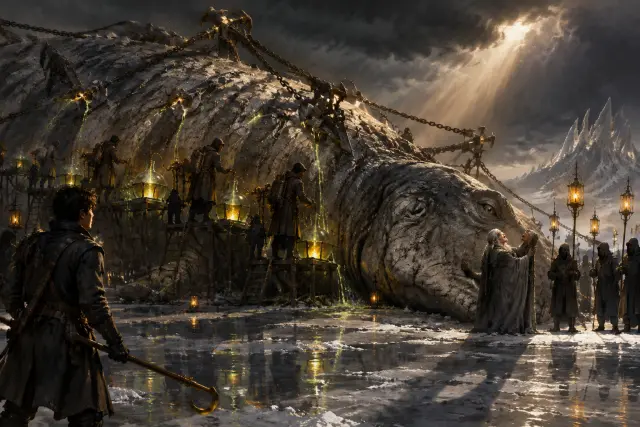
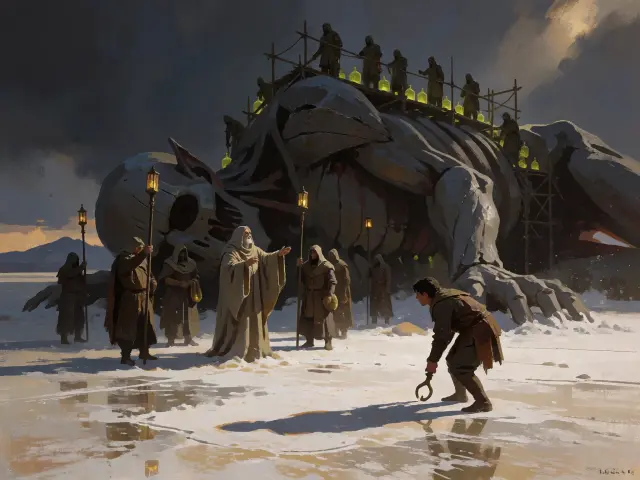
Four key visuals were generated from The Ichorfall Marches — two briefs, two models, published as four works. The world key visual asks for the frontier in one frame; the event key visual asks for the Giving, with the pinned titan, the singer, and the brakeman. Both briefs were run through GPT Image 2 and Krea 2 with no changes to the prompt between models, which is what makes the comparison honest.
A Closer Look: The Giving Pair
The Giving pair is the harder brief and the better test. GPT Image 2 builds the scene: the titan’s eye calm and open, the chains taut, the ichor running in bright threads into carboys, the singer’s hand on the jaw, the brakeman in the foreground. Krea 2 turns the same brief into an icon: a grey mass under scaffold, a row of green lights, hooded wardens, one pale-robed figure with an open hand. The first is a moment you walk into; the second is a memory you carry out.
GPT Image 2 vs Krea 2 — Which Should You Use?
GPT Image 2 for cover-ready detail: separated value planes, legible landmarks, wet salt and lamp-light that survive a long look, and enough texture to read as a painting. Krea 2 for a poster that has to work at thumbnail size: cleaner silhouettes, flatter values, and a composition that reads in one second. A practical rule: use GPT Image 2 for the key visual that lives on a storefront, and Krea 2 for the version that lives in a social feed.
Prompts That Work
- Name the frame — “a wide establishing shot of a frontier at dusk”, “a single rite on a flooded salt flat”, “a city built inside a ribcage”.
- Give one light source — “hundreds of small amber lamps”, “a single shaft of storm-light”, “a low bronze sun on wet salt”.
- Anchor the palette — “ash grey, bone white, deep umber, one restrained amber-green”.
- Stage a small figure — tiny hunters in the shadow of a titan give scale; a young brakeman in the foreground gives the frame a witness.
- Close the door on text — end with “no text, no watermark, no logo”.
Beyond the Poster
The key visuals published from this world are works — but the world behind them is the actual asset. The same ribcage city can light a game cover, a video thumbnail, a location card, or a scene background. Because the world holds the atoms, a new render does not have to rediscover the palette or the cast; it inherits them.
Who Is It For?
Indie studios that need a monster-hunting cover before the art pipeline exists. World-builders who want a canon-consistent look for a campaign. Writers who need a visual pitch for an industrial, ash-choked fantasy. Solo creators who want a detail-first and an atmosphere-first option from the same prompt. And anyone who has ever wanted to stand at the foot of something too big to fight.
Limitations to Know
GPT Image 2 is slower than lightweight models and favors detail over speed. Krea 2 is faster and cleaner but will simplify faces, hands, and small props, which can cost you a character beat. Neither model knows the source genre’s canon, so the world seed has to carry the names, palette, and rules. And a key visual is still a cover: it sells the world, it does not replace the world-building behind it.
Frequently Asked Questions
- Do I need to know Monster Hunter to use this? No. The world seed explains the frontier, the palette, and the cast; the prompt only needs a scene.
- Can I use the outputs commercially? The works here are published public works of a public world; fork the world and generate your own version for production.
- Why run two models? Because a cover and a feed image are different jobs, and the comparison shows both answers from one prompt.
- How much lore do I need? None to start — one sentence about a city in a ribcage and one lamp is enough for a first render.
Start Creating
Fork The Ichorfall Marches or start from your own one-sentence titan-hunting brief. The world ships with its 27 atoms, its ash-and-amber palette, and four published key visuals — your cover is one prompt away.
Start Creating
Two models, one world, a painterly titan-hunting cover in minutes — rendered, published, and remixable.