Deltarune AI Art — Generate Dark World Scenes and Characters in 16-Bit Pixel Style
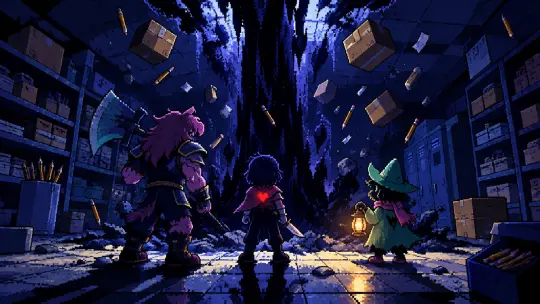
Make Deltarune AI art from a sentence: 16-bit pixel scenes of the Dark Fountain, the Card Kingdom and the cast, generated inside a built world with GPT Image 2 and Krea 2.
Make your own Deltarune AI art
Generate Deltarune fan art from a sentence — 16-bit pixel scenes of the Dark Worlds, the cast and the fountains, built inside a world that already knows the canon.
Deltarune AI art is fan art made with an image model instead of a drawing tablet, and the difference that matters is not the tool — it is whether the model knows what it is drawing. Ask a general model for "Deltarune" and you get a guess: a purple dinosaur, a red heart, some pixel filter. Ask a model that is working inside a built world, with the cast, the palette and the four laws of the Dark already written down, and you get a scene that could sit in the game.
What Deltarune AI Art Actually Means
There are three different jobs people mean when they say they want Deltarune art, and they need different prompts. The first is a key visual: one frame that explains a place or a turning point. The second is character art: a single figure, legible, on-model, usable as an avatar or a poster. The third is a sprite or scene asset: something small, tileable, engine-ready. Most disappointing results come from asking one prompt to do all three.
This page is built on a real world, Deltarune: Fountains of the Dark — 27 atoms and four published key visuals — so every example below is an actual output, not a mock-up. The two models used are GPT Image 2 (detail, depth, prop density) and Krea 2 (flat poster colour, speed, stronger silhouette). Both were given identical prompts.
Three Kinds of Deltarune Art Worth Making
- The key visual — one frame that carries a place: the fountain under the school, the Card Kingdom parade, the Cyber World skyline. Composition first, cast second. This is the image that makes someone ask where the world is from.
- The character frame — one figure, one mood, one prop. Kris with the knife and the red SOUL; Susie with the axe and the grin; Ralsei with the lantern. Character art fails when it tries to include the whole party.
- The sprite or tile — small, square, high-contrast, readable at 32×32. Different prompt entirely: fewer colours, no lighting drama, silhouette doing all the work.
What You Can Generate From This World
The Palette Problem
Deltarune's look is not "retro" in general — it is a specific narrow palette: indigo and near-black for the Dark Worlds, bone white and cream for interiors, one hot crimson for the SOUL and the Card Kingdom, and a warm amber for lanterns and screen glow. If you do not state those four colours in the prompt, both models will invent a fifth and sixth, and the image will stop looking like the same world. The fix is not a reference image; it is a sentence.
The sentence that works: "limited 24-colour palette of deep indigo, bone white, crimson and warm amber, crisp nearest-neighbour square pixels, three-step pixel shadows, selective dithering." Once that is fixed, the subject can change freely and the images still belong together.
Character Consistency Without Reference Images
You do not need a LoRA or an uploaded reference to keep Kris looking like Kris. You need a cast block: a short, concrete description of silhouette, clothing and prop that you paste into every prompt, unchanged. Susie is "a towering purple monster in battered armour with a huge axe over one shoulder"; Kris is "a silent teenage human in a striped shirt with a faint red heart glowing through the chest". The model does the rest, and the world supplies the consistency.
Two rules make the cast block work. First, always describe the silhouette before the face, because at pixel scale the shape is the character. Second, always name the prop — axe, lantern, knife, bicycle — because props are what the model can reliably repeat.
A Scene Library to Render First
The fountain
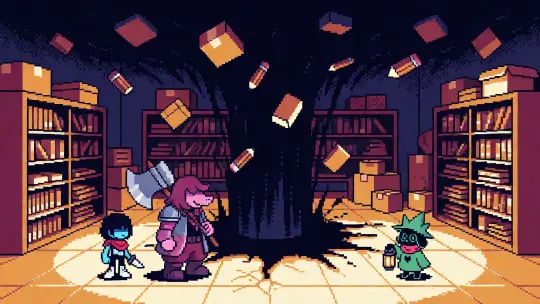
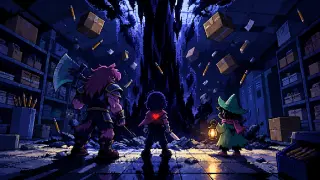
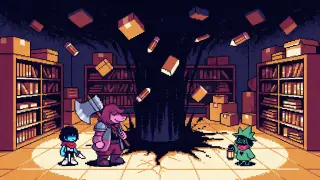
A black column in a supply room, three silhouettes in front of it. This is the establishing image; get the palette right here and everything after inherits it.
The parade
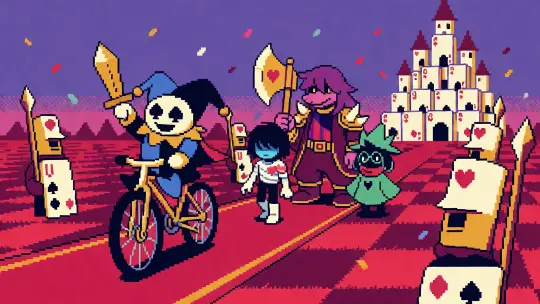
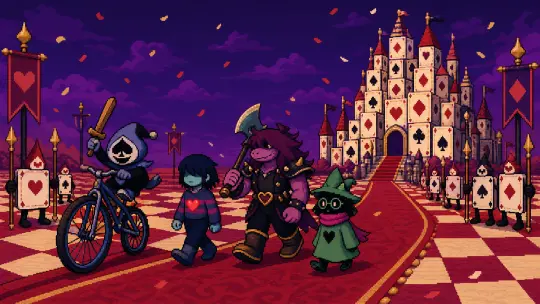
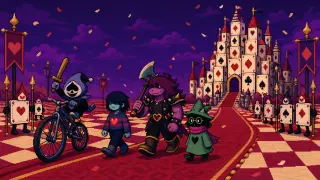
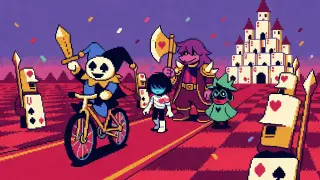
Lancer on the bicycle, the party on the red carpet, card soldiers at the edges. This is the image that proves the world can be warm.
One character frame
Susie, three-quarter view, axe on the shoulder, one light source. Character art is a different discipline: fewer props, stronger pose.
One quiet place
Castle Town at lantern-light, or the bunker door in the pines. The image that gives the world a slower register.
One wrong place
Cyber World in the rain, or TV World under the spotlights. The image that shows what the Dark Worlds cost.
Recipe: The Dark Fountain
Write the room first, then the wound, then the cast. The room is ordinary — shelving, cardboard boxes, wet floor tiles. The wound is a vertical black column that swallows the ceiling. The cast is small: three figures at the base, one of them holding a lantern, one carrying an axe, one with a red heart visible through the chest. Add motion last: boxes, pencils and paper pulled upward.
Recipe: The Card Kingdom Parade
This one is a procession, not a portrait. Put the smallest character in front (Lancer, on a bicycle too big for him), the party in the middle at three different heights, and the castle behind as a silhouette. Add two ranks of card soldiers to frame the edges and confetti to give the air some texture. If the castle is as detailed as the characters, the image collapses; it has to stay a shape.
GPT Image 2 or Krea 2?
Use GPT Image 2 when the image has to explain a place: multiple landmarks, a depth stack, props that establish scale. It is slower and costs more, and it rewards a long prompt. Use Krea 2 when the image has to sell a mood: posters, avatars, title cards, social crops. It is fast and cheap, and it rewards a short, front-loaded prompt with the style named early. For a world page, run both on the same prompt and publish the pair — the comparison is more useful to a reader than either image alone.
A Prompt Template You Can Reuse
16:9 [image type] for the world "Deltarune: Fountains of the Dark" → [place: fountain / Card Kingdom / Cyber World / Castle Town / TV World] → [cast block with silhouettes and props] → [light source and palette: indigo, cream, crimson, amber] → [16-bit constraints: 24 colours, nearest-neighbour pixels, three-step shadows, dithering] → no text, no logo, no watermark, no border.
What to Avoid
- Smooth gradients they instantly break the 16-bit read — ask for stepped shadows and dithering instead
- Legible text signage, logos and UI labels are the most common failure on both models
- Too many characters three figures per frame is the reliable limit at pixel scale
- Photo lighting no lens flare, no depth of field — pixel art has no camera
- Late style instructions put the medium and palette in the first two sentences, not the last
From Art to World
The reason these images hold together is that they were not made one at a time from scratch. They were generated inside a world that already had a cast, a map, four laws and a palette. That is the difference between a folder of fan art and a body of work: the world is the brief, and every new image is an edit of it rather than a new guess.
Frequently Asked Questions
- Can I make Deltarune AI art for free? You can start from a sentence on Neta Studio and generate from the public world without writing a prompt from scratch. Cost per image depends on the model: Krea 2 is the cheap option, GPT Image 2 the detailed one.
- Which model is better for pixel art? GPT Image 2 for scenes with depth and props; Krea 2 for posters, avatars and flat colour. Run the same prompt on both and compare.
- How do I keep characters on-model? Use a fixed cast block — silhouette, clothing, prop — pasted unchanged into every prompt.
- Can I sell the images? Check the model's terms and the rights of the underlying IP before any commercial use. This is a fan world, not an official licence.
- What if the image looks like smooth digital painting? The style contract is too weak. Add the palette, the pixel grid and the dithering in the first two sentences.
Start With This World
A cast, a map and four laws are already written. Generate your first Dark World scene without briefing anyone.