
Low Poly Racing Game — Free, Runs in Your Browser
A low poly racing game trades detail for speed: flat-shaded triangles keep 400-meter straights smooth. Play one free in your browser, no download.
Make your own low poly racing game
What makes a great low poly racing game, plus a browser low poly world you can move through now — and the tools to build your own track.
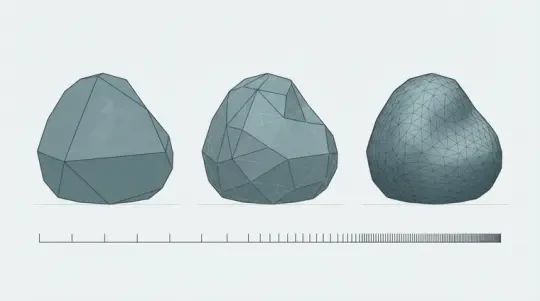
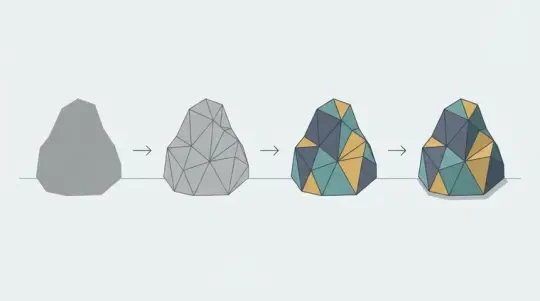
A low poly racing game is a racing game whose geometry is deliberately coarse: flat-shaded triangles, no normal maps, no high-frequency texture detail. That constraint is not a limitation you tolerate — it is the thing that makes the game work at speed. When a car crosses a 400-meter straight in a few seconds, your eye is not resolving wheel spokes. It is reading silhouette, facet shading, and the rate at which scenery passes. Low poly geometry gives the renderer headroom to keep those cues smooth.
This page covers what actually separates a good low poly racer from a bad one, then puts a low poly world in front of you that you can move through in the browser right now. After that, it walks through building your own track in the 3D game builder: laying road on a grid, placing props that function as speed cues, and closing the loop. No download step, no engine install.
Why Low Poly Works for Racing
The core argument is perceptual. At 200 km/h, a flat-shaded facet moving across the screen reads as motion. A textured surface with fine detail reads as noise, because the texture minifies faster than the mip chain can resolve it. Low poly sidesteps that entirely: fewer, larger facets mean the aliasing problem shrinks at the same time the frame budget grows. You stop fighting shimmer and start selling speed.
The second argument is arithmetic. A track segment modeled at 2,000 triangles instead of 40,000 triangles does not just render faster. It lets you place more segments, more scenery, and more opponents before you hit the frame ceiling. In a racing game, frame time is not a comfort feature. It is input latency. Every millisecond of GPU time is a millisecond between the player seeing a corner and the car responding to the correction.
This is why low poly racing games tend to run well on modest hardware and in a browser tab. The render cost is dominated by draw calls and fill rate rather than raw triangle throughput, so a low poly scene with aggressive frustum culling stays inside a 16.6 ms budget at 60 fps on integrated graphics. The style is not a fallback for weak hardware. It is a decision that keeps the hardware out of the way.
Flat shading and the motion read
Flat shading gives every triangle a single normal, so each facet has one luminance value. As the camera pans, those values change in discrete steps. The eye picks up those steps as a velocity signal, the same way a low-frame-rate strobe makes a wheel look like it is spinning. On a smooth-shaded surface, that signal is smeared across a gradient and the motion read weakens.
Where the triangle budget actually goes
In a low poly racer, the car is rarely the expensive object. The track is. A 5 km circuit chunked into 100-meter segments with culling has a bounded visible set, but a single 5 km mesh does not. Budget the track in segments and let the culling do the work. The car can afford 6,000 to 12,000 triangles; a single segment cannot.
What Makes a Great Low Poly Racer
The first constraint is track readability at speed. A corner must be legible before the player arrives at it. That means visual separation between road and off-road, consistent edge treatment on both sides of the ribbon, and a clear apex cue. If the road surface and the shoulder share a value and a hue, the player will not read the corner until they are already in it. Value contrast between road and surroundings matters more than texture detail on the asphalt.
The second constraint is a horizon that sells speed. A flat empty horizon communicates nothing about how fast you are going. You need objects at known intervals — barriers, signs, poles, ridgeline facets — so the player has a rate reference. Scatter these at roughly even spacing along the straight and then let the spacing compress through the corner. The eye reads the compression as deceleration and the expansion as acceleration, even when the speed value has not changed.
The third constraint is a camera that never loses the road. A chase camera needs a look-ahead distance that scales with speed, a height that keeps the road ribbon visible under the car, and a yaw that trails the car's heading rather than snapping to it. If the camera yaw snaps, the world whips and the player loses spatial orientation. Damped yaw with a short time constant — enough to feel responsive but not instantaneous — keeps the road anchored in frame.
- Road/off-road value separationThe road ribbon and the surrounding terrain should differ by enough luminance that the edge reads at a glance. If in doubt, darken the terrain rather than brighten the road.
- Interval-based speed cuesProps spaced at even intervals give the player a rate reference. Their apparent compression through a corner is the speed read.
- Speed-scaled camera look-aheadLook-ahead distance should grow with velocity; if it does not, the player outruns the frame at high speed.
- Damped camera yawTrailing yaw keeps the road anchored. Snapping yaw is the fastest way to make a good track unreadable.
Move Through One Right Here
The playable world embedded on this page is the closest thing to a track we can put in a browser today. It is low poly, flat shaded, and built to be moved through rather than watched. Use the movement controls to travel the space; the geometry is coarse on purpose so that the frame rate stays high enough to read motion rather than just see a scene.
What to look for while you move: the facets on the ground plane catch light at different angles as you pass, and those angle changes are the motion cue. The horizon is populated rather than empty, so you have something to track against. Try a long straight then a turn and notice how your sense of speed changes even though the movement speed does not. That is the horizon doing its job.
This world is a demonstration space, not a finished circuit. It has no lap timer and no opponent. Its purpose is to show how the low poly read behaves in a live browser session on your actual hardware, which is the only benchmark that matters for a browser game.
Build Your Own Track
Building a track in the 3D game builder means placing geometry on a grid, not sculpting a mesh. You work in world units, and the grid gives you consistent scale: one grid cell equals a known distance, so a 20-cell straight is a fixed length regardless of who builds it. Start with the road ribbon, then place the props, then set the spawn and close the loop.
The failure mode to watch for is a track that is readable in the editor but not at speed. Build one straight, move the camera to the driver's eye height, and run it before you build the rest. If the corner at the end of the straight is not legible from the start of the straight, fix the value contrast or the prop placement before adding more track. It is cheaper to fix one segment than twenty.
01
Lay the road on the grid: place road segments cell by cell, keeping the ribbon width constant in world units. Vary the corner radius, not the width.
02
Set the road/off-road value contrast: assign the road one material and the surrounding terrain a distinctly different value so the edge reads at speed.
03
Place speed-cue props at even intervals along each straight: barriers, poles, or markers at consistent spacing so the player has a rate reference.
04
Compress prop spacing through corners: tighter spacing through the turn signals deceleration and gives the apex a visual anchor.
05
Set the spawn point and heading: place the spawn on the road centerline, facing along the direction of travel, and confirm the camera has a clear look-ahead at spawn.
06
Close the loop: connect the final segment back to the first so the track is continuous, then run a full lap at speed and fix anything that stops reading.
Low Poly Cars & Assets
Cars and props can come from either direction: import an existing low poly asset set, or generate one that matches your track's style. The constraint that matters is consistency of facet density. A car modeled at 12,000 triangles dropped onto a track built from 200-triangle segments will look wrong, because the two objects resolve detail at different scales. Match the densities or match the shading, and preferably both.
Agent Sprite Forge generates sprite and asset sets, which is useful when you need a coherent set of cars and props with the same visual language rather than a pile of individually downloaded models. If you generate a set, generate the cars and the trackside props together in one pass so the palette and facet density stay aligned. Mismatched generation passes are the most common cause of a track that looks assembled rather than designed.
The Cyclops' Island is a worked example of a low poly world in the studio's assets: it shows how a coherent low poly environment holds together when every object shares a shading decision. Use it as a reference for palette and facet density before you build your own set.
- Facet density matchingKeep the car's triangle count within the same order of magnitude per visible surface area as the track segments. Wildly divergent densities read as stylistically broken.
- Single palette per setGenerate cars and props from one palette. Adding a second palette later is the usual source of tracks that look mismatched.
- Flat shading throughoutApply flat shading to every object in the set. One smooth-shaded object in a flat-shaded scene is immediately visible and undermines the motion read.
- Reuse before you modelA single barrier model rotated and recolored covers most of a track. Fewer unique meshes means fewer draw calls and better frame time.
Walk into the world it belongs to
A sprite is a character with nowhere to stand. The last step is the one nobody else offers: take the sheet you just built and put it in a world someone can walk around in — a small island, a planet, a rainy street corner. Every world on this site was made from one written description and published as a page you can play.
FAQ
Can you actually race in a browser? +
Yes. The playable world on this page runs in the browser tab and you can move through it without installing anything. Frame rate depends on your hardware and the scene's draw-call count, but a low poly scene with bounded visible segments stays inside a 60 fps budget on typical integrated graphics.
Do I need to write code to make a low poly racing game? +
No. In the 3D game builder, you lay road segments on a grid, place props, set the spawn point, and close the loop using the builder's placement tools. Code becomes relevant only if you want custom behavior beyond what the builder exposes.
Where do the low poly cars and props come from? +
You either import an existing low poly set or generate one with Agent Sprite Forge. The thing that matters is consistency: generate the cars and the trackside props in one pass so they share a palette and a facet density.
How do I make a track that reads well at speed? +
Start with road/off-road value contrast so the edge is legible, place props at even intervals along each straight as speed cues, and compress their spacing through corners. Then set the spawn on the centerline with a clear look-ahead and run a full lap at speed before adding more track.
What limits performance in a browser low poly racing game? +
Draw calls and fill rate, not raw triangle count. A 2,000-triangle segment rendered as a separate mesh costs more than the same geometry merged. Keep the visible segment set bounded with culling and reuse meshes rather than multiplying unique ones.
Can you export a track to a full engine later? +
Yes. The scene can be exported to move it into a full engine when the browser runtime stops being sufficient. That is the usual path if you later need custom physics or larger opponent counts than the browser runtime handles.
Back to the 3D Game Builder
All 31 finished 3D worlds, games and scenes live on one page — every one of them playable.