The Best AI Anime Character Design Sheet Generator
Produce full turnaround design sheets — front/side/back, proportions, and expression keys in one AI-powered workflow.
Turn One Sentence Into Professional Character Design Sheets
Generate turnaround views, expression keys, and proportion guides for anime characters with AI that understands character design — no 3D modeling or illustration skills required.
What Is a Character Design Sheet?
A character design sheet is the professional blueprint animators and illustrators use to maintain visual consistency. It shows your character from multiple angles (front, side, back, three-quarter), expression variations, proportion guides, and key design details. Traditional design sheets take hours of manual illustration; Neta Studio's AI generates them from a single sentence, letting you iterate on proportions, costume details, and poses in minutes instead of days.
Why AI Character Design Sheets Matter for Anime Creators
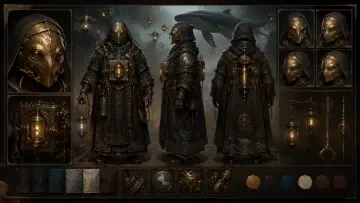
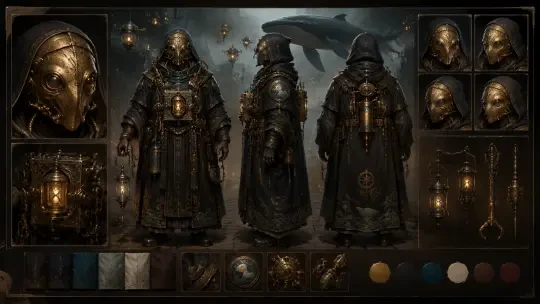
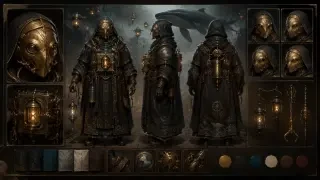
Whether you're planning a visual novel, pitching an anime concept, building a game, or developing an original character for your portfolio, design sheets are the difference between a loose sketch and a production-ready asset. They ensure your character looks consistent across scenes, angles, and artists. Neta Studio turns the design-sheet bottleneck into a creative accelerator: describe your character once, generate turnarounds instantly, fork and remix existing works like "Character Design Sheet / Turnaround Views — Orin, the Brass-Masked Mechanic-Priest," and publish your character bible for your team or community.
How Neta Studio's AI Anime Character Design Sheet Generator Works
Write a one-sentence brief
Describe your character: appearance, costume, personality cues, and the design-sheet elements you need (turnaround, expressions, props).
The AI builds a world board
Neta Studio interprets your brief and assembles a structured project — character profile, visual reference, and layout logic for your design sheet.
Generate your design sheet
Hit generate and the AI produces front/side/back turnaround views, proportion guides, expression keys, or profile cards — all in a cohesive anime style.
Iterate and refine
Adjust details: tweak proportions, swap costume elements, change expressions, or regenerate specific views without starting from scratch.
Publish and share
Export your design sheet as high-res images, share your project publicly, or let others fork your character as a starting point for their own designs.
What You Can Create
- Turnaround views — front, side, back, and three-quarter angles with consistent proportions and costume details.
- Expression sheets — multiple facial expressions (neutral, smile, anger, surprise) for animation and comic reference.
- Proportion guides — height charts, body ratios, and scale comparisons for consistent character modeling.
- Character profile cards — visual dossiers with portrait, personality traits, backstory snippets, and design notes.
- Costume breakdowns — detailed views of armor, accessories, weapons, and alternate outfits.
Example Prompts to Get Started
Create a character design sheet for a post-apocalyptic mechanic with brass goggles, oil-stained overalls, and a prosthetic arm — front, side, back views with proportion guide.
Perfect for steampunk visual novels or dieselpunk game concepts. Start from "Character Design Sheet / Turnaround Views — Orin, the Brass-Masked Mechanic-Priest" and customize the aesthetic.
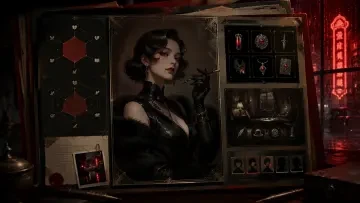
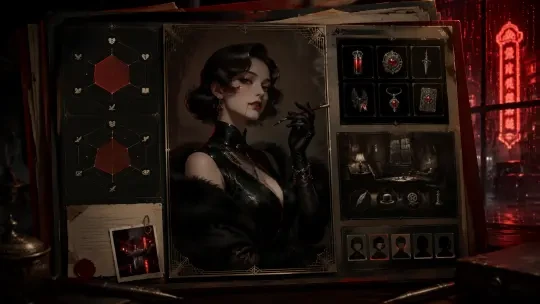
Generate a vampire detective character profile card: 1930s Shanghai noir aesthetic, qipao dress, fedora, silver cigarette holder — include expression sheet and height comparison.
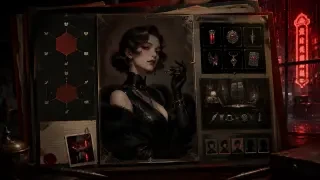
Ideal for period mysteries or supernatural noir. Fork "Character Profile Card — Nyx, the Vampire Detective of 1930s Shanghai" to explore variations.
Neta Studio vs. Generic AI Art Tools
| Feature | Generic AI | Neta Studio |
|---|---|---|
| Turnaround views | Inconsistent angles | Locked proportions |
| Design iteration | Start from scratch | Edit details in place |
| Output format | Single images | Structured sheets |
| Workflow | Prompt → pray | Brief → board → refine |
| Community | No remixing | Fork and build on others |
Real Works You Can Fork and Customize
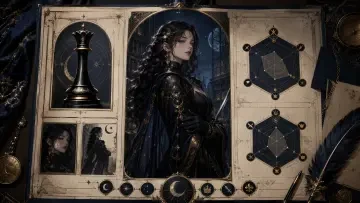
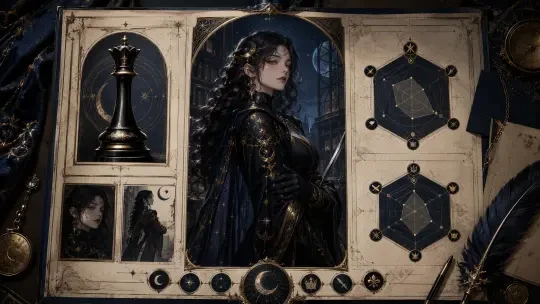
Neta Studio is built for iteration and remixing. Browse public design sheets like "Character Design Sheet / Turnaround Views — Orin, the Brass-Masked Mechanic-Priest" to see professional turnaround layouts, or fork "Character Profile Card — Evelyn Nocturne, the Lunar Archivist" to explore archival fantasy aesthetics. Every published work is a starting point: fork the project, tweak the prompt, adjust the design elements, and regenerate. Your character sheets become part of a growing library of anime character references anyone can learn from and build on.
Who Uses AI Character Design Sheets?
- Visual novel developers — maintain character consistency across hundreds of scenes and sprite variations.
- Indie animators — create production-ready turnarounds for character modeling and animation reference.
- Game designers — prototype hero and NPC designs with proportion guides for 2D or 3D asset pipelines.
- Manga and comic artists — build character bibles with expression sheets and costume breakdowns for serialized work.
- Concept artists and portfolio builders — rapidly explore character archetypes and generate portfolio-quality design sheets.
Advanced Turnaround Techniques
Professional character design sheets require more than a single front view. Neta Studio's AI generator handles multi-angle turnarounds, proportion guides, expression sheets, and costume breakdowns in one cohesive package. Start from a work like Character Design Sheet / Turnaround Views — Orin, the Brass-Masked Mechanic-Priest to see how front, side, and three-quarter views maintain consistent details across every angle. The AI preserves silhouette, costume hardware, and facial features while rotating the character through space.
- Multi-angle turnarounds — front, side, back, and three-quarter views with consistent anatomy and costume.
- Proportion overlays — head-height grids and measurement annotations that animators need.
- Expression and pose variations — idle, action, emotion studies on the same sheet.
- Accessory and costume breakdowns — separate views for weapons, gear, alternate outfits.
Iterate and Refine Your Character Sheets
The best character sheets emerge through iteration. Neta Studio's workflow lets you generate a first draft, adjust proportions or costume details in your brief, and regenerate until every angle is production-ready. Fork existing works like Character Profile Card — Evelyn Nocturne, the Lunar Archivist to adapt the art style and layout for your own character, then publish your version for your team or the community. Every iteration stays linked to your world board, so you can maintain a consistent visual language across dozens of characters.
From Design Sheet to Production Pipeline
Character design sheets are the bridge between concept and animation. Once you've generated your turnaround sheet, export it as a reference for riggers, modelers, and animators. The AI generates sheets at high resolution with clear separation between views, making it easy to extract individual angles or overlay proportion grids. Teams use Neta Studio sheets to onboard new artists, maintain consistency across episodes, and accelerate the jump from storyboard to final animation.
We used to spend two weeks per character getting turnarounds approved. With Neta Studio, we draft the entire cast in a weekend, iterate based on director feedback, and hand off production-ready sheets in days, not months.
This acceleration matters for indie studios and freelancers working on tight deadlines. The AI handles the tedious work of maintaining consistency across angles, freeing artists to focus on storytelling and direction.
Design Sheets for Every Genre and Style
- Shounen action — dynamic poses, muscle definition, battle-damaged costume variants.
- Isekai and fantasy — armor breakdowns, magical effects overlays, class-specific gear.
- Slice-of-life and romance — school uniforms, casual wear, seasonal outfit variations.
- Cyberpunk and sci-fi — tech implants, modular gear, holographic UI elements.
- Historical and period — era-accurate clothing, cultural details, like Character Profile Card — Nyx, the Vampire Detective of 1930s Shanghai.
Why Professional Creators Choose Neta Studio
| Feature | Neta Studio | Generic AI Tools |
|---|---|---|
| Turnaround consistency | Built-in multi-angle logic | Manual re-prompting |
| Proportion guides | Auto-generated overlays | Post-process in Photoshop |
| World consistency | World board memory | None |
| Collaboration | Fork, share, publish | Export and email |
| Iteration speed | Seconds per variant | Minutes per re-gen |
Frequently Asked Questions
Can I generate turnaround sheets with consistent anatomy? +
Yes. Neta Studio's AI is trained to maintain character proportions, costume details, and facial features across front, side, and back views. Works like Character Design Sheet / Turnaround Views — Orin, the Brass-Masked Mechanic-Priest show how the system locks silhouette and anatomy across all angles.
Do I need to describe every angle separately? +
No. Write one character brief describing personality, costume, and role, and the AI generates all turnaround angles automatically. You can refine individual views by adjusting your brief and regenerating.
Can I add proportion grids and annotations? +
Yes. Include "with proportion grid" or "head-height measurements" in your brief to generate overlay guides. You can also export high-resolution sheets and add custom annotations in your design software.
Can I fork existing design sheets and customize them? +
Absolutely. Browse published works, fork any character sheet, and edit the brief to change costume, color palette, or accessories while keeping the original composition and turnaround structure.
What resolution are the generated design sheets? +
Neta Studio generates character sheets at high resolution suitable for print and production reference. Export options let you save individual angles or the full sheet composite.
How do I maintain consistency across multiple character sheets? +
Use a world board to define your anime's visual style, color palette, and world rules. Every character sheet you generate from that world board inherits the same aesthetic, ensuring your entire cast feels cohesive.
Start Creating Professional Character Sheets
Whether you're building a cast for your indie anime, pitching a series to studios, or assembling reference materials for your team, Neta Studio's AI character design sheet generator gives you production-ready turnarounds in minutes. Write a one-sentence brief, let the AI generate multi-angle views with consistent anatomy and costume details, iterate until perfect, and publish or share with your collaborators. Start from existing works like Character Profile Card — Nyx, the Vampire Detective of 1930s Shanghai or create your own from scratch.
Start Creating
Generate professional character design sheets with consistent turnarounds and proportion guides.