The Best AI Anime Opening Title Card Generator
Design striking title cards and episode intros — typography, glow, motion.

Create Your Anime Opening Title Card in Seconds
Generate professional episode intros with cinematic typography, glowing effects, and atmospheric motion — from a single sentence.
What Makes an Anime Opening Title Card Unforgettable
The title card is the first impression of every episode — three seconds that set the tone, genre, and emotional weight. Great anime openings layer bold typography with atmospheric effects: lens flares that echo hope, particle systems that suggest magic or technology, color grading that signals danger or warmth. Traditional design tools force you to master ten different programs; Neta Studio lets you describe the feeling and generates a complete title sequence with typography, lighting, and motion in one pass.
Why Photoshop and After Effects Can't Keep Up
| Traditional Tools | Neta Studio |
|---|---|
| Hours of manual layer setup | One-sentence brief |
| Separate apps for text, effects, animation | Unified workflow from idea to render |
| Steep learning curve for motion graphics | Describe motion, glow, timing — AI handles execution |
| Static templates with limited customization | Infinite variations; fork any work and iterate |
How Neta Studio Builds Your Title Card
Every title card begins with a brief — describe the series name, visual mood, color palette, and typography style. Neta Studio's AI interprets your intent, generates a world board with typography layout, atmospheric effects, and lighting, then renders the full composition. You can refine typography weight, adjust glow intensity, or regenerate specific elements until it matches your vision. Publish to share with your community or export frames for video editing.
Write Your Brief
Describe the title, genre, mood, and visual effects in one sentence — 'Cyberpunk detective series title card: neon kanji with rain effects and purple glow.'
Generate the World Board
AI builds the composition: typography hierarchy, atmospheric layers, color grading, particle effects, and lighting setup.
Refine Typography & Effects
Adjust font weight, glow intensity, particle density, or motion timing. Regenerate individual elements or try alternate compositions.
Render & Export
Generate final frames at high resolution. Download for video editing, publish to your Neta Studio profile, or share for others to fork.
Start from Proven Title Card Templates
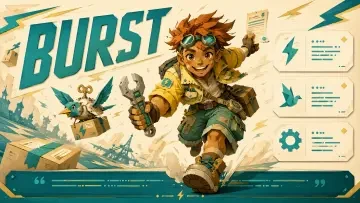
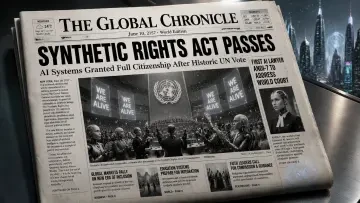
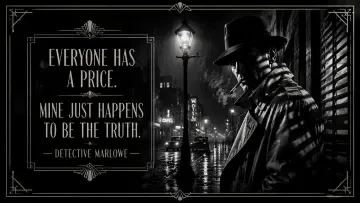
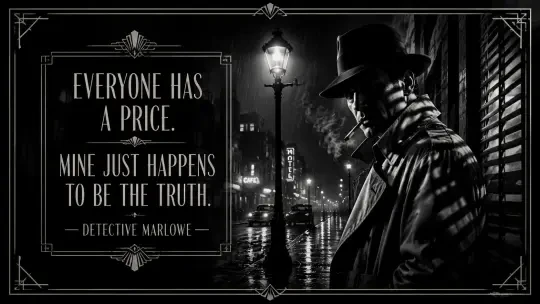
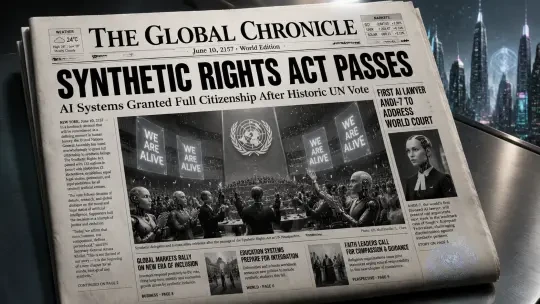
Neta Studio's community has already created title card designs across every anime genre. Fork Quote Card — Detective Marlowe, the Noir Detective to explore film-noir typography with rain overlays and moody lighting. SBTI Personality Poster: The Spark Runner — Design Your Own Archetype Poster demonstrates bold character intro cards with dynamic text and gradient backgrounds. Historical Newspaper: Robot Awakening Declaration shows how period-specific typography combines with dramatic headlines. Each work is a starting point — change the title text, swap the color scheme, adjust the atmospheric effects, and make it yours.
Typography That Commands Attention
Anime title cards rely on typography to communicate genre instantly. Bold sans-serif with sharp edges signals mecha or action; elegant serif with flourishes suggests historical drama or romance; distressed stencil fonts evoke post-apocalyptic grit. Neta Studio interprets your genre description and selects typography that matches: weight, kerning, baseline alignment, and decorative elements. You can specify 'brush calligraphy' for samurai epics, 'holographic text' for sci-fi, or 'hand-drawn titles' for slice-of-life warmth.
Visual Effects: Glow, Particles, Atmosphere
- Glow and bloom — Soft halos around text for magical or ethereal moods; sharp neon glow for cyberpunk intensity.
- Particle systems — Falling sakura petals, sparks, embers, snow, or energy orbs that reinforce the series theme.
- Atmospheric depth — Fog, light rays, lens flares, and bokeh that add cinematic layering.
- Color grading — Warm sunset tones for nostalgia, cool blues for mystery, high-contrast reds for action.
Who Uses AI Anime Title Card Generators
- Indie visual novel creators — Generate episode and chapter title cards without hiring motion designers.
- YouTube anime reviewers and essayists — Create custom intros that brand each video series with professional polish.
- Webcomic and webtoon artists — Design season or arc title cards that match the comic's aesthetic.
- Game developers — Build mission briefing screens, chapter intros, and story beat title cards for narrative-driven games.
- Fan projects and doujin circles — Produce opening sequences for fan animations, audio dramas, or community events.
Example Prompts to Spark Your First Title Card
"Shonen battle anime title card: 'Fist of the Crimson Dragon' in bold kanji with flames and red lightning, intense orange glow, black background with speed lines."
Start specific — name the series, describe the text treatment, list two or three atmospheric effects, and declare the color mood. The more vivid your brief, the closer the first generation lands to your vision. Once you have a base, iterate on typography weight, glow radius, or particle intensity until it feels right.
Iteration and Refinement: The Creative Loop
Your first generation is never your last. Neta Studio's iteration engine lets you tweak typography weight, shift glow intensity, adjust particle density, or rewrite the tagline—without starting over. Each change builds on your world board, preserving your aesthetic while exploring variations. This is where a good title card becomes unforgettable.
- Instant previews — see every change in real time, no render queue.
- Version history — compare iterations side by side, roll back to any previous state.
- Selective edits — change only the title font or only the background glow, lock everything else.
- Prompt refinement — add "more neon," "darker shadows," "sharper edges" to your brief and regenerate layers.
Publishing and Sharing Your Title Cards
Once your title card is polished, Neta Studio offers one-click publishing to your portfolio, social media, or project archives. Every published work becomes a forkable template—other creators can start from your design, remix the typography, and adapt your aesthetic to their own series. This collaborative model turns every title card into a launchpad for new stories.
- Direct export — download as PNG, animated GIF, or video file for editing suites.
- Share links — generate a public URL with embedded metadata and creation notes.
- Fork to remix — let others build on your work, just as you forked templates like Quote Card — Detective Marlowe, the Noir Detective to explore noir aesthetics.
- Embed in presentations — use title cards in pitch decks, series bibles, and episode breakdowns.
Real Examples from Neta Studio
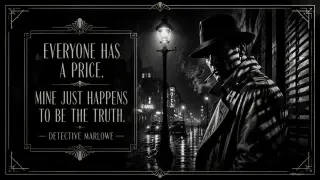

These three works showcase the range of AI-generated title cards: from moody noir to narrative newspapers to vibrant character posters. Each started with a one-sentence brief, evolved through world board composition, and was refined through iterative prompt adjustments. You can fork any of these to explore their aesthetic DNA, adapt their typography choices, or remix their glow and particle effects for your own series.
Anime Title Cards vs. Generic Graphic Design Tools
| Feature | Generic Tools | Neta Studio |
|---|---|---|
| Anime aesthetics | Manual font hunting, effect layering | Trained on anime openings, automatic style matching |
| Typography + glow | Separate plugins, manual blending | Unified system, one-prompt generation |
| Iteration speed | Re-export every change | Real-time previews, instant refinement |
| Templates | Static PSD files | Forkable works like Historical Newspaper: Robot Awakening Declaration |
| Collaboration | File sharing, version chaos | Built-in forking, remix culture |
Perfect for Multiple Content Formats
Anime title cards aren't just for full-length episodes. Creators use Neta Studio's title card generator for YouTube anime reviews, podcast episode art, fan series intros, visual novel chapter breaks, and even social media posts. The same workflow—brief, world board, generate, iterate—adapts to any format where striking typography and atmospheric visuals matter.
- YouTube thumbnails — bold titles with glowing edges, optimized for small screens.
- Podcast cover art — seasonal anime podcast series with consistent title card branding.
- Visual novel chapters — episodic title cards that introduce new story arcs.
- Social media posts — eye-catching quote cards like Detective Marlowe, the Noir Detective for Twitter/Instagram.
- Convention posters — large-format prints for anime con screenings and panel announcements.
From Concept to Final Card in Minutes
I needed title cards for a twelve-episode fan series. In Photoshop, the first card took four hours. On Neta Studio, I forked SBTI Personality Poster: The Spark Runner, adapted the color palette and typography style, and generated all twelve in an afternoon. The consistency across episodes would have been impossible manually.
This speed advantage isn't just about efficiency—it's about creative freedom. When iteration costs minutes instead of hours, you experiment more, explore bolder ideas, and find designs you'd never have attempted manually.
Frequently Asked Questions
Can I use custom fonts in my title cards? +
Yes. Neta Studio supports font uploads and integrates with Google Fonts. You can specify a font family in your brief or upload a TTF/OTF file, and the AI will apply it to your title card typography while maintaining proper weight, kerning, and glow effects.
Do I need animation skills for motion title cards? +
No. Neta Studio generates motion automatically when you include "animated" or "motion" in your brief. The AI applies professional easing curves, particle movement, and fade-in sequences. You can adjust timing and intensity through simple prompts like "slower fade" or "faster particle drift."
Can I export title cards for commercial projects? +
Yes, with a commercial license. Neta Studio offers flexible licensing for YouTube channels, streaming series, and commercial anime production. All exports include full resolution (up to 4K) and support transparency for compositing in editing suites.
How do I maintain consistent branding across multiple title cards? +
Save your first title card as a template. When you generate subsequent cards, reference the original work in your brief ("use the same typography and glow style as [Work Title]") or fork it directly. The AI preserves font choices, color palettes, and effect intensity while adapting the content for each new episode.
What if I want to edit the title card outside Neta Studio? +
All title cards export with layered PSD files or transparent PNG layers. You can import them into Photoshop, After Effects, Premiere Pro, or any editing suite and adjust individual elements—typography, glow, background, particles—manually. The AI generation gives you a professional starting point, and you retain full creative control.
Can I create title cards in languages other than English? +
Absolutely. Neta Studio supports Japanese, Chinese, Korean, and dozens of other languages. Write your brief and title text in your target language, and the AI will handle font selection, character spacing, and typographic conventions appropriate to that writing system.
Start Building Your Signature Title Card
Start Creating
Design your first anime title card in minutes—no design experience required.
Keep going
More from the same studio