
The Best AI Fantasy MOBA Key Visual Generator — Splash Art from One Prompt
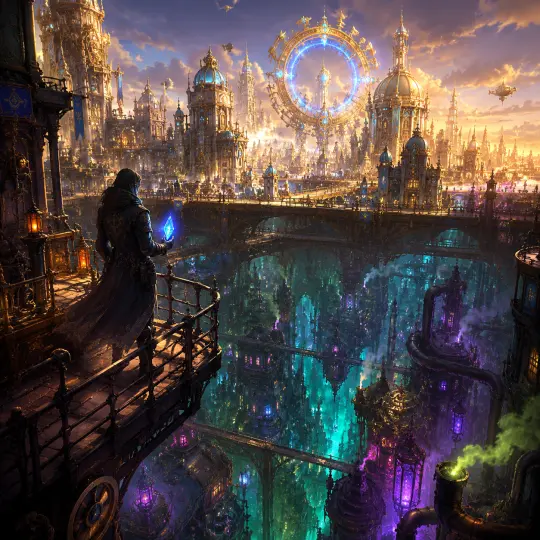
Create fantasy MOBA splash-art key visuals with GPT Image 2 and Krea 2, proven on the League of Legends: World of Runeterra world.
Generate Fantasy MOBA Splash Art from One Sentence
Describe your champions, factions and battlefield once. Neta Studio turns that brief into poster-grade MOBA key visuals rendered with GPT Image 2 and Krea 2.
What Is an AI Fantasy MOBA Key Visual Generator?
A fantasy MOBA key visual is the hero image of a multiplayer battle-arena world: the splash-art poster that shows rival champions, the faction they fight for and the place they fight over, all in one frame. Neta Studio's key visual generator builds that poster from a single sentence. You describe the scene, Neta expands it into a world board with factions, champions, palette and mood, then renders polished splash art with GPT Image 2 or Krea 2. The result is a launch-ready image for a pitch deck, a community post, a fan world or the cover of your next interactive story.
Why Splash Art Makes or Breaks a MOBA-Style World
In MOBA-style worlds, players meet a champion through splash art before anything else. One image has to communicate role, faction, power fantasy and tone, often at thumbnail size. Generic AI images tend to produce a pretty character with no world around it. A strong key visual needs dynamic posing, readable silhouettes, a clear focal point, a faction-specific color language and an environment that tells a story. Neta Studio's workflow is built around those requirements, so your first render already looks like key art.
- Champion splash art — single-hero posters with dynamic poses, signature weapons and elemental effects framed like a character reveal.
- Faction key visuals — city-states, cursed isles, empires and tribes rendered as one cohesive poster with their own palette and architecture.
- Rivalry posters — two sides facing off across a bridge, a battlefield or a broken skyline, built for versus-style storytelling.
- Team lineups — multi-champion compositions where each hero keeps a readable silhouette and a distinct color accent.
- Season and event art — mood-driven variations of your world for launches, patches, lore drops or fan campaigns.
Proven on League of Legends: World of Runeterra
This workflow isn't theoretical. On Neta Studio, the League of Legends: World of Runeterra world has four real published key visuals made this way: a Twin Cities key visual and a Shadow Isles black-mist key visual, each rendered with both GPT Image 2 and Krea 2. Comparing them side by side shows how the same brief can lean toward a crisp, composition-driven poster or a painterly, atmosphere-heavy splash. You can start from that world, study how its faction briefs were structured, and fork the approach for your own MOBA-style universe.
“A cursed island drowned in black mist, spectral champions emerging from the fog, sickly teal light cutting through ruined cathedrals — fantasy MOBA splash art, poster composition.”
One sentence like this is enough. Neta Studio expands it into a world board covering faction, palette, champions and lighting, then renders the key visual. That is the same brief-first approach behind the Shadow Isles black-mist key visuals in the League of Legends: World of Runeterra world.
Example Prompts for Fantasy MOBA Key Visuals
- Twin-city rivalry — “A gleaming upper city of brass and crystal above a smog-choked undercity, two sister champions facing each other across the divide, splash-art key visual.”
- Cursed faction reveal — “Black mist rolling over a ruined isle, a wraith king holding a spectral blade, teal and obsidian palette, cinematic MOBA poster.”
- Elemental lineup — “Five champions of fire, frost, storm, stone and void standing on a cracked arena floor under a blood moon, wide key-art framing.”
- Lone champion splash — “A desert ascended warrior mid-leap beneath a golden sun disc, sand exploding around her spear, painterly splash art.”
- Season launch art — “A frozen northern tribe marching through a blizzard toward a glowing ice citadel, banners whipping, epic season-launch key visual.”
How It Works: From One Sentence to Splash Art
Write a one-sentence brief
Describe your champions, faction and battlefield in plain language. Mention mood, palette or rivalry if you have them. If you don't, Neta fills in the gaps.
Review your world board
Neta Studio expands the brief into a world board covering factions, champion roles, color language, architecture and lighting. Edit anything before you render.
Generate with GPT Image 2 or Krea 2
Render the key visual with the model that fits your goal. Use GPT Image 2 for tight prompt adherence and clean composition, or Krea 2 for a painterly, atmospheric splash-art finish.
Iterate on poses, palette and framing
Adjust the champion pose, shift the camera, push the faction colors or swap the time of day. Every iteration keeps the same world board, so your art stays consistent.
Publish, share and let others fork
Publish the key visual to your world on Neta Studio, share it with your community, and let other creators fork your world to build their own champions and factions.
GPT Image 2 vs Krea 2 for MOBA Splash Art
| What you need | GPT Image 2 | Krea 2 |
|---|---|---|
| Best for | Complex multi-champion scenes that must follow the brief closely | Moody, painterly splash art with rich lighting and texture |
| Composition | Clear focal hierarchy and readable silhouettes | Atmospheric depth, fog, glow and cinematic color grading |
| Typical use | Rivalry posters, team lineups, faction overviews | Champion reveals, cursed or mystical factions, mood pieces |
| Runeterra example | Twin Cities and Shadow Isles key visuals | Twin Cities and Shadow Isles key visuals |
Why Neta Studio Beats Generic AI Image Tools
Generic image generators treat every prompt as a one-off, so your second champion rarely matches the first and your faction colors drift with every render. Neta Studio anchors each key visual to a world board, which keeps factions, palettes, champions and lore consistent across every poster you make. Two top-tier models sit behind a single brief, so you can compare GPT Image 2 and Krea 2 renders of the same scene without rewriting anything. And because every key visual lives inside a world you can publish, share and fork, your splash art becomes the opening chapter of a living MOBA universe instead of a stray file in a downloads folder.
Build a World Board Before You Generate
The biggest difference between a forgettable fantasy render and real MOBA splash art is context. Neta Studio turns your one-sentence brief into a world board first: factions, champion archetypes, regional palettes, signature materials, and lighting rules. Every key visual you generate draws on that board, so a frost-bound warrior and a desert mage still feel like they belong to the same roster. This is how the League of Legends: World of Runeterra world kept its four published key visuals visually unified.
- Factions and regions: name each faction once so every champion inherits its architecture, banners, and color story.
- Champion roles: tag heroes as assassin, mage, tank, marksman, or support so pose and silhouette match the fantasy.
- Palette rules: lock two or three hero colors per region for instant recognition at thumbnail size.
- Ability language: define how magic looks, such as runic glyphs, hextech sparks, or shadow mist, so effects stay consistent.
- Lighting mood: choose dramatic rim light, golden hour, or storm glow once and reuse it across the series.
Anatomy of a Great MOBA Splash Art Composition
- A readable silhouette: the champion must be identifiable even when cropped into a tiny loading-screen card.
- A dynamic action pose: mid-leap, mid-cast, or weapon raised, because splash art captures a moment, not a portrait.
- Signature ability effects: energy trails and particles that point the eye back to the hero's face.
- A world-building background: ruins, spires, or battlefields that hint at the faction without stealing focus.
- Room for a title: negative space on one side for the champion name, logo, or event branding.
Who This Generator Is For
- Indie game developers: pitch a MOBA or hero shooter concept with polished key art before hiring a full art team.
- Fan worldbuilders: expand MOBA-inspired universes with new champions, regions, and seasonal events.
- Tabletop and TTRPG creators: give each faction leader or boss a cover-worthy splash moment.
- Streamers and community managers: make banners, thumbnails, and event posters that feel native to the genre.
- Illustrators and concept artists: explore poses, palettes, and compositions fast, then refine the strongest direction by hand.
Iterate Toward a Signature Splash Style
Your first generation is a starting point. On Neta Studio, you can keep the same world board and adjust one variable at a time, such as camera angle, time of day, ability color, or which model renders the image. Use GPT Image 2 when you need precise prompt-following, readable layouts, and title-safe space. Switch to Krea 2 when you want painterly texture and cinematic lighting. Because the world context stays fixed, each iteration gets you closer to a house style instead of drifting into a new look.
Great splash art doesn't come from one perfect prompt. It comes from a world that knows what it looks like, and a workflow that lets you push one champion at a time until the whole roster sings.
That is the idea behind Neta Studio's flow: one-sentence brief, world board, generate, iterate, then publish, share, and fork. It is the same loop used to build the four key visuals in League of Legends: World of Runeterra.
Workflow Checklist: Neta Studio vs a Blank Prompt Box
| Step | Neta Studio | Blank prompt box |
|---|---|---|
| Starting point | One-sentence brief expanded into a world board | Long prompt rewritten for every image |
| Roster consistency | Factions, palettes, and lighting reused automatically | Style drifts between generations |
| Model choice | GPT Image 2 and Krea 2 in one place | Usually locked to a single model |
| Iteration | Change one variable while the world stays fixed | Every tweak risks a brand-new look |
| Sharing | Publish to a world others can browse and fork | Download and upload elsewhere |
Publish, Share, and Fork Your Key Visuals
When a splash piece is ready, publish it to your world on Neta Studio. Your key visuals then live alongside the lore and factions that inspired them, instead of sitting in a downloads folder. Other creators can browse the world, fork it, and build their own champions on top of your art direction. Start by exploring League of Legends: World of Runeterra, fork it, and generate a new champion for a region the original series hasn't covered yet.
Tips for Consistent Champions Across a Series
- Name your champions: a named hero with a role and faction gives the model a stable anchor across generations.
- Repeat signature props: a recurring weapon, crest, or rune makes a champion recognizable in any pose.
- Vary the camera, not the canon: try low-angle heroics or over-the-shoulder shots while keeping costume and palette fixed.
- Match the model to the moment: use GPT Image 2 for clean, title-ready posters and Krea 2 for moody, painterly hero shots.
Fantasy MOBA Key Visual FAQ
Can I really get splash art from one prompt? +
Yes. A single sentence such as a champion, faction, and moment is enough. Neta Studio expands it into a world board and generates a full key visual. You can then iterate to refine pose, lighting, or effects.
Which model should I use: GPT Image 2 or Krea 2? +
Pick GPT Image 2 for precise composition and poster layouts with space for titles. Pick Krea 2 for painterly texture and cinematic atmosphere. Many creators draft with one model and finish with the other.
How do I keep a whole champion roster consistent? +
Generate every champion inside the same world. The world board carries factions, palettes, and lighting rules from image to image, which is how League of Legends: World of Runeterra keeps its four key visuals cohesive.
Can I build on someone else's MOBA world? +
Yes. Published worlds on Neta Studio can be forked. Fork a world, keep its art direction, and add your own champions, regions, and key visuals.
Is it only for League-style worlds? +
No. The same workflow works for any fantasy MOBA, hero shooter, or arena game concept, including original worlds you invent from scratch.
Start Creating
Turn one sentence into a whole roster of fantasy MOBA splash art, then publish your world for others to explore and fork.