
How to Use GPT Image 2 for Princess Mononoke Key Visuals
A three-lesson workflow for turning the world's cards into key visuals: San on the root, the Sacred Pool at night, and Iron Town at dusk.
How to Use GPT Image 2 for Princess Mononoke Key Visuals
This guide teaches the model through the world. Instead of a list of magic phrases, you get three lessons — a character, a location and a town — each built from a card, a beat and a camera. By the end you should be able to write a Mononoke key visual prompt in about four minutes and repair it in one pass.
It assumes no prior knowledge of the film and no prior experience with image models. You need the world's cards, GPT Image 2, and one decision per lesson: what is happening in the next ten seconds.
What You Need Before You Start
The world cards
Eight characters, five locations, five events, four factions and four rules. You do not need all of them. You need one character or place, plus one rule that constrains it.
GPT Image 2 access
Text input only is fine. Reference images are supported but not required for any lesson here.
Two frame sizes
1024×1536 for characters and posters, 1536×1024 for places and crowds. Decide before you write the prompt, because the crop is part of the composition.
One exclusions line
"No text, no watermark, no modern objects." Paste it every time. It prevents most of the boring failures.
Understand the World's Visual Grammar
The four rules are also four image instructions. Learn them once and you stop needing to describe the setting from scratch.
The grammar also has a colour rule: earth palette for the human world, one cold emission for the sacred. Moss, clay, iron, undyed cloth — then a pale blue-white that does not obey the sun. If your image has no impossible light, it is a historical scene, not a myth.
Build the Prompt in Five Layers
Five layers, each doing a different job. If you only remember one thing from this guide, remember the order.
[style] Princess Mononoke [shot type] key visual, hand-painted anime cel, muted earth palette, [aspect]: [subject + costume + props]; [companions]; [place + weather]; [named light source + impossible light]; [camera height + composition]; no text, no watermark, no modern objects.
Lesson 1: San on the Root
Read the card
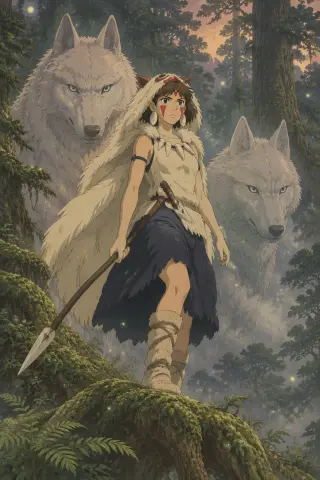
Pelt hood and cloak, red paint on both cheeks, bone dagger, spear, raised by wolves. The card's hidden instruction is hierarchy: the wolves are larger than she is.
Choose the beat
Dusk, before a raid, at the edge of the forest. Standing, not posing. Looking out of frame, not at the camera.
Write five layers
Cel style; San in pelt with spear and dagger; two white wolves behind her in mist; moss-covered root above a ravine; warm western horizon plus cold green shadow; low camera, vertical.
Generate at 1024×1536
High quality. Check hands, paint, and whether the wolves are behind her. A wolf beside her changes the story from pack to pet.
Repair one clause
If the pelt reads as a cloak, replace "pelt hood" with "animal hide with visible fur break and ragged hem". If the spear is vague, add "wrapped grip, leaf-shaped iron head".
The GPT Image 2 result is a three-plane scene: root, girl, ravine. The Krea 2 result on the same prompt is a flatter night poster with a red spear shaft and glowing mushrooms. Both are valid. The GPT version explains the place; the Krea version sells the character at a glance.
Lesson 2: The Sacred Pool
Pick the rule and the hour
The Law of the Forest Spirit. Night gives you the walker and the emission; day gives you the deer and the human face. This lesson uses night with the human face kept.
Set the camera at water level
Low camera, wide frame. The pool becomes a mirror and the god becomes both body and reflection.
Name two lights
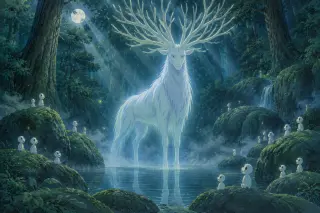
Moonlight through cedar and the god's own pale blue emission. Two sources, one cold, one colder. Without both you get blue fog.
Add small lives for scale
Kodama on the mossy rocks, some near the camera, some far. They give the god an audience and a size.
Generate at 1536×1024
Check the face first, then the antlers, then the waterline. If the face has become a deer, repeat "calm human face with dark eyes" and reduce the antler count.
GPT Image 2 fills the canopy with antlers and scatters kodama across the whole frame. Krea 2 comes closer, simplifies the crown and lines the kodama up like a chorus. For a location that must feel vast, take the GPT frame. For a cover that must read at 300 pixels, take the Krea frame.
Lesson 3: Iron Town at Dusk
Choose the social fact
Iron Town is a refuge funded by deforestation. The image must show both: warm human industry and the cut forest behind it.
Build the layers of the town
Wall, gate, wooden scaffolding, furnace chimney, women at the bellows, rifle racks, lepers on the upper terrace. Pick three, not seven.
Put one figure above the town
Eboshi on a walkway with the furnace behind her. Dark kimono, short rifle, soot on the forearms. She should be the only still thing in the frame.
Light it from inside
Furnace orange as the key, cold blue dusk as the fill, black smoke against a green-black ridge. The town should be the warmest object in a cold world.
Generate wide, crop tight
Start at 1536×1024 to establish the geography, then crop a portrait for the cover. Do not generate the portrait first and try to add a town behind it.
This is the lesson where GPT Image 2's depth matters most. A forge town is a stack of planes — near scaffolding, middle gate, far furnace, forest behind — and a flat composition turns it into a wall of brown. If the first result is a wall, add "foreground walkway in shadow, middle ground gate lit by furnace, background ridge and smoke" and run it again.
Iterating Without Losing the World
Reading a Failed Generation
GPT Image 2 vs Krea 2: Which for Which Shot
- Character sheetGPT Image 2 for the detailed version, Krea 2 for the graphic version. Run both from the same prompt; use the GPT one to check costume logic, the Krea one for the cover.
- Location establishing shotGPT Image 2. It builds depth, a far bank, a waterfall, a canopy. Krea 2 flattens the same scene into bands and loses the geography.
- Social media cropKrea 2. Strong centred silhouette, two or three values, readable at small size, and about five times cheaper per image.
- Anything with a face that must be wrongGPT Image 2. It will hold the human face on a deer, the fear on a hunter, the soot on Eboshi. Krea 2 tends to prettify and soften.
Publishing and Reusing
Publish the image with the card it came from, not as a standalone picture. A viewer who can open San's card, read the pelt and the paint, and then see the image will understand why it looks the way it does. That link between text and image is the difference between a world and a gallery. Keep the world's independent, non-affiliated note with any reuse, and do not present generated frames as official stills.
Checklist Before You Publish
Questions About This Workflow
How long should one image take?
About twenty minutes once you know the world: three minutes choosing the argument, four writing the layers, five generating on both models, five repairing one clause, three filing the result back into the card. The first image takes longer because you are learning the palette.
Do I need to prompt in English?
Both models were tested in English and the clause order assumes English weighting. If you write in another language, keep the style clause first and the exclusions last; the middle layers are more forgiving than the ends.
Use the guide on the real world
The cards, the images and the comparison are all in one place. Generate your first key visual — or open the studio and pick a scene the guide does not cover.
These key visuals were generated from this world's materials with GPT Image 2 and Krea 2. Princess Mononoke is an independent, fan-built world in Neta Studio and is not affiliated with Studio Ghibli. The key visuals on this page were generated inside this world; every character, place and event is an editable material rather than canonical text. Open the studio to read every card.