
How to Use Seedance 2.0 for Anime Openings — A Step-by-Step Guide
Six steps from a one-sentence brief to a published anime opening beat — with real Seedance 2.0 and Kling outputs from the Sakura Genesis Academy world.
How to Use Seedance 2.0 for Anime Openings
This guide walks the full workflow — from a one-sentence brief to a published anime opening beat — using the Sakura Genesis Academy world as the test bed. Everything you see here was actually generated with Seedance 2.0 and Kling in this session; every asset is a real router-files URL. By the end you will know exactly how to prompt, render, chain, and title-card your own OP.
What You Need
- A world — Sakura Genesis Academy works out of the box; any original world on Neta Studio works too
- A one-sentence brief — location, character signature, motion, ending frame
- Seedance 2.0 — the video renderer (1080p, synced audio, last-frame chaining)
- Optional: Kling — the fast validation pass before you commit the final render
- Optional: GPT Image 2 — the key visual and title-card poster
Step 1 — Pick the Beat
An anime OP is a sequence of beats: montage opener, action clash, transformation flash, emotional pause, fireworks finale. In Sakura Genesis Academy each event maps to a beat — the Awakening Festival is the inciting montage, the Starfall Tournament is the action, the Void Petal Incident is the turn, and the Fireworks Finale is the title-card beat.
Step 2 — Write the One-Sentence Brief
The brief carries four things: location, character signature, motion, and ending frame. The brief that produced the works on this page: "Aoi sprints across the rooftop, red scarf streaming, petals whip past the camera, transformation glow ignites, fireworks bloom over the torii gate, title-card-ready final frame."
Step 3 — Render with Seedance 2.0
Set 1080p, 16:9, 5–8 seconds, audio on. Seedance 2.0 accepts text, image, and video inputs — so you can start from your key visual or from a reference video. The festival beat below is the direct output of this step.
Step 3 output — Festival Awakening · 1920×1080 · 6s · synced audio · rendered from one sentence.
Step 4 — Validate with Kling
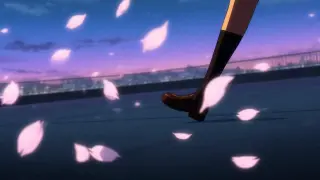
Before committing the expensive final render, validate the concept with Kling — faster, cheaper, same 16:9 framing. The same brief produces a different cut; compare them and pick the pacing that fits your OP.
Step 4 output — same brief via Kling · 16:9 · 5s · the concept-validation pass.
Step 5 — Chain the Shots
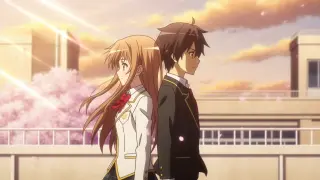
Seedance 2.0 returns the last frame of every render. Feed that frame back as the first frame of the next beat, and your cuts will match perfectly — no flicker, no style drift. The Rooftop Promise beat below is the emotional core shot that slots between the action and the finale.
Step 5 output — Rooftop Promise · 1920×1080 · 6s · back to back at sunset, petals between them.
Step 6 — Build the Title Card
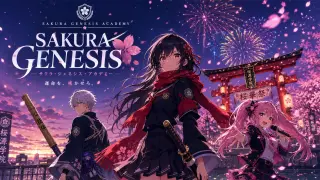
The OP ends on a title-card-ready frame. GPT Image 2 renders the poster with the series logotype — the SAKURA GENESIS key visual below is that poster. Drop it on the final frame of your sequence and the OP is done.
Prompt Cheat Sheet
Transformation
"Petals swirl into a spiral, light bursts from her chest, camera whip-pans to fireworks, title-card-ready ending."
Action
"Ren and Sora clash at the Starfall Courtyard, ice petals shatter, pond mirrors the sky, fast cuts."
Montage
"Train doors open at Sakura Line Station, students run through the gate, lanterns light one by one."
Emotional
"Golden sunset, slow orbit, petals drifting between them, soft lens flare, gentle smiles."
Model Comparison Summary
Seedance 2.0 — 1080p–2K, 4–15s takes, synced audio, image/video inputs, last-frame chaining. Best for: final deliverables.
Kling — 16:9/9:16/1:1, 5–10s takes, fast and cheap. Best for: concept validation.
GPT Image 2 — key visuals and title cards with clean typography. Best for: the poster and logotype frame.
Workflow — validate with Kling → deliver with Seedance 2.0 → poster with GPT Image 2.
Troubleshooting
Characters drift between shots
Anchor one signature detail per character in every prompt — Aoi's red scarf, Ren's bamboo sword — and chain last frames between beats.
Palette shifts between beats
Name the palette in every brief: sakura pink, lantern gold, dusk violet.
Title card has no room
Ask for "clear negative space at the top" in the final beat, or render the poster separately with GPT Image 2.
Audio feels off
Disable generate_audio on the render and score the OP yourself — the last frame still comes back clean.
FAQ
How many beats make a full OP?
Five is the classic structure: montage, action, transformation, emotional pause, finale title card.
Can I use this for a visual novel?
Yes — VN openings are the same format; use the world's characters and locations as your beats.
Is this workflow IP-safe?
Yes — Sakura Genesis Academy is an original world; every generated frame is original content.
Where are the outputs stored?
Every render lands on a shareable router-files URL — no local storage needed.
Go Build Your Opening
Six steps, one world, two models, four shareable works — that is the whole pipeline. Open Sakura Genesis Academy on Neta Studio, write your sentence, and let the festival write the rest.
Start the Guide
Follow the six steps with Sakura Genesis Academy — your OP is one sentence away.
Keep going
More from the same studio