Sticker Maker: a 16-Panel Sheet From One Sentence

A sticker maker that turns one sentence into a 16-panel sticker sheet — one character, sixteen expressions. What you get, how to cut it and where it works.

What a sticker maker actually makes
Most sticker makers online give you one sticker at a time and a crop tool. That is fine for a single reaction image and useless for a pack, because a pack only works when the same character appears eight or sixteen times without changing face, proportion or palette. The useful version of this tool starts from the other end: one sentence in, a whole sheet out.
Here the output is a 16-panel sheet — the same character in sixteen expressions, gestures and meme-ready poses, drawn in one consistent style and saved as a work with its own page. You print it, cut it, and use it. It is not sixteen transparent files, and it does not push a pack into a chat app for you; it gives you the artwork that makes those things possible.
| Output | One 16-panel sticker sheet |
| Input | One sentence: character plus vibe |
| Consistency | Same character across all sixteen panels |
| Not | Sixteen pre-cut transparent files or a chat-app export |
Turn one sentence into a sheet
Name the character, give it one visual anchor and one mood range. The sticker-pack skill lays out sixteen panels with the same face and palette, then saves the sheet as a work.
What is on the sheet
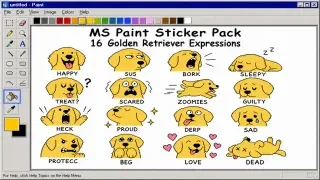
Sixteen panels is not a random number: it is roughly what a chat pack needs, with room to throw away the four weakest. The grid usually holds a range — a neutral face, a laugh, a cry, a rage, a shrug, a sleep, a thumbs-up, a facepalm, plus a few poses that read at small sizes. The white border around each panel is what makes the cut look intentional instead of torn.
- Sixteen panels — Enough for a chat pack, a journal page or a product insert, with spares if one panel comes out weak.
- One character, one style — The whole sheet is drawn together, so panel 1 and panel 16 share a face, a palette and a line weight.
- White border per panel — A built-in cut line. Scissors follow it; a craft cutter follows it better.
- Expressions and gestures — Not just faces: hands, props and poses that make a reaction legible at 64 pixels.
- Saved as a work — The sheet gets its own page and URL, so you can reopen, compare and reuse it later.
How to describe a character that survives sixteen panels
The failure mode is a description that is only a mood. “A cute cat” gives the model sixteen different cats. “A grumpy orange tabby with one torn ear, a red collar and heavy eyelids” gives it one cat sixteen times, because every panel has something to hold on to. Pick one silhouette, one accessory and one colour, then let the mood range do the rest: the character stays, the expression changes.


Sheets made this way
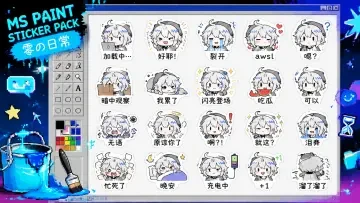
These are real outputs, not mockups. Two sticker sheets, a mascot that survives being printed at postcard size, and two card formats for when a single character deserves more than a panel. Notice that the strongest ones are the simplest: one shape, one colour, one joke.


The 16-panel sheet as a chat pack
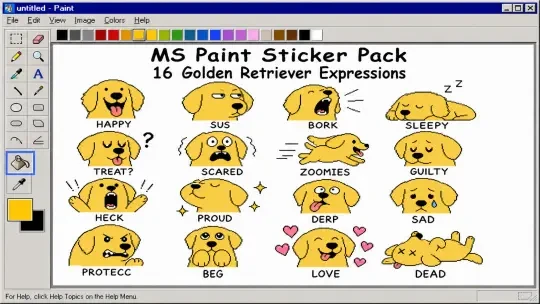
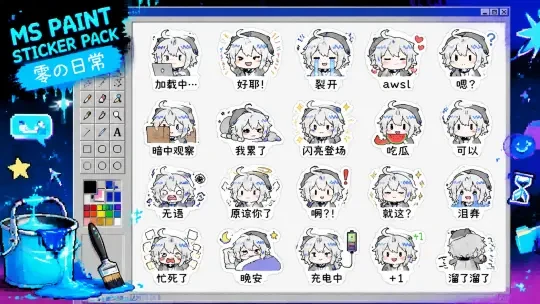
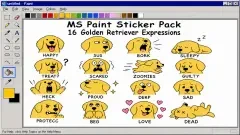
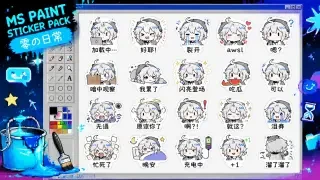
The golden retriever sheet is the cleanest demo of the format: sixteen expressions of one dog, each readable as a thumbnail. Zero’s Daily does the same with an original character on a fixed neon palette, which is the harder test — an invented character has no familiar face to fall back on, so the anchor has to be in the description.
When the character needs more than a panel
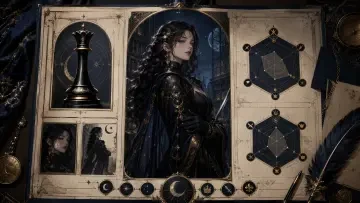
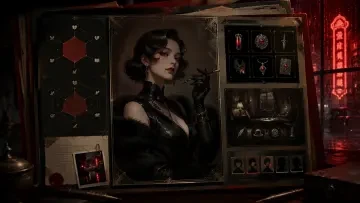
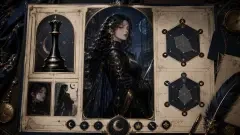
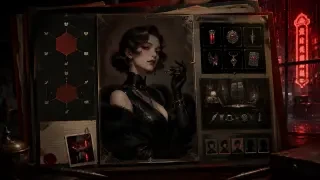
A sticker is a moment; a character is a file. The Nyx profile card puts portrait, name and stats on one panel, and the Evelyn dossier treats the same idea as a case file. Use the sheet for reactions and the card for identity — they are two formats of the same character bible, and they should share a palette.
Three steps from sentence to sheet
Write the anchor, not the vibe
One species or archetype, one accessory, one colour. “A sleepy detective in a brown coat with a bent cigarette” beats “noir detective” because every panel can repeat the coat and the cigarette.
Generate the sheet
One sentence, one 16-panel sheet. Look for the four weakest panels first — those tell you whether the anchor held or whether the character drifted between panels.
Print, cut, use
Print on sticker paper or plain paper with a glue stick, cut inside the white border, and keep the sheet scan as your master copy. For chat packs, cut the eight strongest and keep the rest for journals.
Six sheets and cards to open






One sentence is enough to start
Open the generator, describe the character with one anchor, and ask for a sticker sheet. If you want to see what the same engine does with cards and postcards, the skill list is one click away.
Made with the sticker-pack skill
Three named skills do the work on this page. sticker-pack lays out the sixteen panels and keeps the character consistent across them. trading-card builds the flat card format — art, rarity border, stat block, card back — for when you want one character on one panel. holo-card takes that card and adds depth and foil for a 3D version. Nothing here is a generic image prompt dressed up as a tool: each skill owns a layout.
FAQ
Do I get sixteen separate files?
No. The output is one sheet with sixteen panels. Cutting it into separate stickers is a physical step — scissors or a craft cutter — and splitting the sheet into individual files is an extra step in any image editor. The sheet is the master copy, so keep it.
Can I use the stickers commercially?
You can use and publish what you generate; the sheet is saved as your work with its own page. What you cannot do is present a character from an existing franchise as if it were the franchise’s own art, or use a real person’s likeness without permission.
What size should I print?
A4 or US Letter at 100% gives panels around 45 mm wide, which is a comfortable sticker. Scale up to A3 if you want bigger cuts, and keep the white border at least 2 mm so the cut has room to be imperfect.
Can I make a second sheet with the same character?
Yes, and that is the point of the anchor. Generate the second sheet with the same description plus a different mood range — angry, sleepy, festive — and the character should hold. If it drifts, add the accessory or colour back into the sentence.
Does it work for a brand mascot?
It works best for mascots, because a mascot is already an anchor: one shape, one colour, one expression range. Describe the silhouette and the brand colour, then keep the palette identical across sheets.
Why do some panels look alike?
Models tend to collapse similar emotions into similar faces. If you get four near-identical smiles, ask for physical actions instead of feelings — holding a mug, hiding under a blanket, pointing at a clock. Action forces variation.
Keep reading
Platform: Neta Studio · Type: Sticker maker · Hub: neta.art/app/agent-skills · Works: Golden Retriever — 16 · Zero's Daily · Milk Frog Desk Pet · Travel Milk Frog · Nyx — profile card · Evelyn — dossier