

The 8-Frame Walk Cycle: Frame Counts, Contact Poses and Eight Directions
A walk cycle is not an animation of a leg. It is a repeating sequence of four poses — contact, down, passing and up — and the frame count only decides how finely you sample that sequence. The same holds when you author eight frame walk cycle character sprites for a browser world: the poses are the animation, the sheet is just sampling and storage. Get that order backwards and you spend an afternoon re-exporting a 64-cell atlas to fix a pose you never defined in the first place.
This post covers what each pose in the cycle actually does and what breaks when you hold it too long or too short, the practical frame counts at 4, 6 and 8 frames per cycle, why an idle is a fundamentally different problem from locomotion, why attacks are shaped by anticipation and recovery rather than by the strike, and the sheet layout convention that engines and character creators index by — down, left, right, up, not clockwise.
The four poses, not the leg
Every walk cycle, from a 12-pixel villager to a full skeletal rig, decomposes into the same four keys. The frame count determines how many of them survive to the sheet.
Contact. Both feet are on the ground and the legs are at maximum spread. Contact sets stride length, and stride length sets the character's apparent speed. Nothing else in the cycle is allowed to contradict it.
Down. The lowest point of the hips. The supporting leg absorbs the body's weight. This is the pose that sells mass. Cut it and the character floats.
Passing. The free leg crosses the supporting leg. The body is rising. The foot has to be lifted enough to clear the ground, or the sprite reads as dragging its feet.
Up. Push-off. Hips at their highest, supporting leg extended, heel coming off. This pose is the bounce, and it is the first one people delete when they run out of frame budget.
If you hold any of these too long or too short, the failure is specific and diagnosable.
Pose | Job | Held too short | Held too long |
|---|---|---|---|
Contact | Sets stride length; both feet planted at maximum spread | Legs never fully extend; the walk reads as a shuffle | Foot appears pinned; the character skates |
Down | Lowest hips; absorbs weight | Character floats; no mass | Reads as a limp or a heavy trudge |
Passing | Free leg crosses; body rising | Knee snaps between two frames; leg reads as a smear | Stride collapses; becomes a march in place |
Up | Push-off; highest hips; heel lifts | Walk flattens; no lift | Character hovers off the ground |
Frame counts: 4, 6 and 8
A walk cycle contains two steps — left foot, right foot — so the second half of every cycle is the first half mirrored. That means your frame count is always divided across two steps, and odd numbers force an asymmetry you have to author deliberately.
The 4-frame budget walk. Four cells per direction: contact, passing, contact (opposite), passing (opposite) — or contact, down, contact, down. Two poses per step. You are choosing between stride and weight and you cannot have both. Use this for actors under roughly 24 pixels tall, or for crowds where you are drawing hundreds of instances and the atlas size genuinely matters. At that scale, a one-pixel difference between the down pose and the passing pose is not visible, so the extra frames buy you nothing.
The 6-frame readable walk. Three poses per step: contact, down, passing. You get stride and weight. What you drop is the up pose, which means the walk has no lift and no bounce. This is the most common shipped compromise for eight-direction sheets, and it is the right one when atlas space is the constraint rather than quality.
The 8-frame walk. Four poses per step, twice per cycle. Contact, down, passing, up, and then the mirror. Every pose gets a dedicated frame, including the passing pose. This is the craft reference, and it is what you author at if the sheet is for a hero character.
The 8-frame cycle also gives you a free speed range. Eight frames played at 8 fps is a 1-second cycle, which is roughly a comfortable adult walking pace. The same sheet at 12 fps is 0.67 seconds — a brisk walk. At 16 fps it clips along. One sheet, three readings, no redraw.
Playing an 8-frame walk sheet faster does not turn it into a run. A run has a flight phase where neither foot is on the ground. A walk always has at least one. If you accelerate the walk cycle past a certain point, players read it as a character walking very fast on ice.
Frames per cycle | Poses per step | Cells at 4 directions | Cells at 8 directions | Best at | Give up |
|---|---|---|---|---|---|
4 | contact, passing (or down) | 16 | 32 | under 24 px tall | Either stride or weight |
6 | contact, down, passing | 24 | 48 | 24–64 px | The up pose; no lift |
8 | contact, down, passing, up | 32 | 64 | 48 px and up | Atlas space and authoring time |
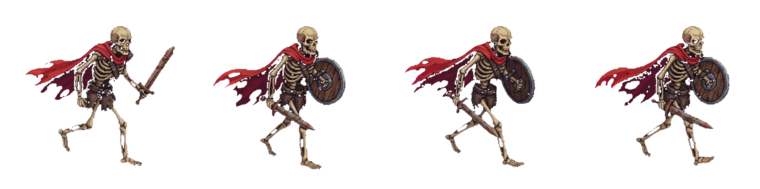
Why eight frame walk cycle character sprites resolved the passing pose
The passing pose is where the two legs overlap in screen space. In a 4-frame sheet, contact and passing are adjacent frames, so the transition from maximum leg spread to legs-together happens in a single step. The knee does not travel; it teleports. At small sizes the eye forgives it. At 48 pixels tall it reads as a stutter.
Giving the passing pose its own frame — with down on one side and up on the other — means the leg travels through three distinct positions per step instead of two. That is the entire argument for eight frames. It is not about smoothness. It is about the leg existing at more than two points in space.
There is a second reason. The passing pose is the only frame where you can show the foot lifting. If passing is folded into an adjacent frame, the free foot either never leaves the ground or pops up and down between contact poses. Both read as a limp.
For any looping sheet of N frames, frame N must be the frame before frame 1, not a duplicate of frame 1. Duplicating the first frame at the end of a loop adds a one-frame stall at the seam. It is subtle at 8 fps and obvious at 16.

Idle has no locomotion to hide behind
A walk cycle can survive a mediocre pose because forward motion and footfalls carry the eye. An idle has none of that. There is no root motion, no contact pose, no weight transfer between feet. What is left is squash and stretch plus the hold.
Squash and stretch only works if volume is preserved. Compress the body and it must get wider; stretch it and it must get narrower. If the silhouette is scaled uniformly, the result reads as a scaling bug rather than as breathing. This is the single most common idle failure, and it is why so many idle animations look like a pulsing sticker.
The held pose does most of the work. A single-frame extreme in a 12 fps loop is on screen for about 83 milliseconds. At a modest sprite size that is often enough to blur into the neighbouring frames rather than register as a shape. Holding the extreme for two or three frames costs nothing — an idle is not competing for frame budget with footfalls — and it is what makes the shape land.
The slime idle in Mini World is built this way, at 8 frames over 12 fps (0.67 seconds):
- Frames 1–2: settle downward, squashing to the compressed extreme
- Frame 3: hold the compressed extreme
- Frame 4: snap to the stretched extreme in a single frame — this is the pop, and it should be the fastest transition in the loop
- Frame 5: hold the stretch
- Frames 6–8: ease back to rest, feeding cleanly into frame 1
The asymmetry is deliberate. Two frames down, one frame up. The compression is the anticipation and the stretch is the release, and the holds at both extremes are longer than the transitions between them.
Attacks: anticipation, impact, recovery
An attack is three beats, and the frame distribution is not even. Take a 12-frame attack at 16 fps — 0.75 seconds total — and allocate roughly:
- Anticipation (the wind-up): 5 frames
- Strike (the travel): 1–2 frames
- Impact hold: 2 frames
- Recovery: 3–4 frames
The wind-up takes more frames than the strike because the wind-up is information and the strike is the result. The player needs time to read that an attack is coming and to move. Cut the anticipation and the attack becomes unreactable — it reads as a teleport rather than as a swing. But if the strike itself takes several frames, the attack loses all force. Mass is sold by speed of travel, not by duration of travel.
A wind-up that matches its strike in frame count reads as a twitch. The ratio is what sells the swing — five frames of build into one frame of travel. If your attack feels weightless, look at the ratio before you look at the drawing.
The impact hold is not an animation frame. It is a render-rate effect: freeze the mixer or the frame timer for 2–4 rendered frames on contact, then resume. It costs nothing in the atlas and it is what makes the hit land.
Recovery is where the state machine lives. The first frames of an attack are committed — the player cannot cancel out of the anticipation. The recovery frames are where you open the cancel window. Implement it as a frame index threshold rather than a timer, so it stays correct when you retime the animation:
if (state === 'attack' && frameIndex >= CANCEL_FRAME && inputBuffered) transition('attack')
That is also why an attack clip should hold its final frame rather than snapping back to idle. The state machine owns the exit, not the animation.
The sheet convention is down, left, right, up
Four-direction sheets index as row 0 down, row 1 left, row 2 right, row 3 up. This is not an aesthetic choice and it is not arbitrary. Three reasons it ended up that way:
Down is the default facing. In a top-down or three-quarter world, the player character faces the camera at rest. Row 0 is the frame you see most, so row 0 is the one you want to be able to use alone if the sheet is truncated or still being authored.
Left and right are authored as one and mirrored. Keeping them adjacent means the mirror step in your export script touches two neighbouring rows instead of two rows separated by the back view.
Up is the back view, and it is the most expensive row to author. No face, no readable silhouette cues, no expression. It is also the row that a 2-direction or 3-direction budget drops first. Putting it last means truncating the sheet removes it cleanly without renumbering anything.
A clockwise sweep — up, right, down, left — is a spatial ordering. A spritesheet is not a space. It is a lookup table, and sorting it by angle costs you the mirror adjacency and buries the least-used row in the middle of the atlas.
For eight directions, there are two common layouts. Pick one and never change it after export, because the row index is baked into every animation reference in the project.
Row | Index-stable layout (recommended) | Rotational layout |
|---|---|---|
0 | down | down |
1 | left | down-left |
2 | right | left |
3 | up | up-left |
4 | down-left | up |
5 | down-right | up-right |
6 | up-left | right |
7 | up-right | down-right |
The index-stable layout keeps the four cardinals at rows 0–3 in the same order as a 4-direction sheet, so dropping from eight directions to four is a truncation rather than a reindex. It also keeps the mirrored pairs adjacent: left/right, down-left/down-right, up-left/up-right.
One failure mode specific to mirroring: do not mirror an asymmetric character in code. A knight carrying a shield on the left arm will have it on the wrong arm in every left-facing frame. Author both side rows, or mask the prop.

Eight frame walk cycle character sprites across eight directions
Eight directions at 8 frames per cycle is 64 cells. Eight directions at 6 frames is 48 — 25 percent fewer cells, one fewer pose to author per direction, and a meaningfully smaller atlas to load in a browser.
The knight sheet in The Cyclops' Island is 48 cells: 6 frames per direction across 8 directions. It keeps contact, down and passing, and drops the up pose. The trade is deliberate. At the sizes the knight is actually drawn at, the push-off is the least legible of the four poses, so it is the cheapest one to lose.
Three rules keep a multi-direction walk consistent across rows:
The vertical bob must match. The hips' height at the down pose has to be identical in every direction. If the down row sits two pixels lower than the side rows, the character changes height when the player rotates the input.
The stride must match across the two side views. If left has a longer stride than right, the character speeds up when it turns around.
The down row can cheat the passing pose. Facing the camera, the far leg is occluded by the near leg at passing, so that frame does less work than the equivalent frame in the side view. Spend the pixels on the side views instead.
Wiring the atlas in Three.js
A spritesheet is not a skeletal clip. An AnimationMixer is not the tool. You are overriding texture coordinates on a single quad or sprite.
Set the texture filtering deliberately:
texture.magFilter = THREE.NearestFilterfor pixel arttexture.minFilter = THREE.NearestFilterif the sprite renders at or near its native sizetexture.minFilter = THREE.LinearMipmapLinearFilterwithgenerateMipmaps = trueif the sprite is heavily downscaled — nearest-neighbour minification aliases badly under camera zoomtexture.colorSpace = THREE.SRGBColorSpace- Leave a 1 px gutter between cells and offset UVs by half a texel:
u = (col + 0.5) / cols
Frame timing should accumulate delta time rather than count render frames, so the animation runs at the same speed on a 60 Hz and a 144 Hz display:
accumulator += delta
while (accumulator >= frameTime) {
  accumulator -= frameTime
  frame = (frame + 1) % framesPerDirection
}
Set frameTime per state, not globally. A walk at cycleDuration / 8, an idle at cycleDuration / 8 with a shorter cycleDuration, an attack as a one-shot that stops on the last index until the state machine exits.
On the material, use alphaTest around 0.5 rather than relying on transparent: true sorting alone. Transparent sprites with soft edges sort unpredictably against each other and against world geometry, and in a top-down world that shows up as characters flickering behind grass.
What to check before export
- Frame N is the frame before frame 1, not a copy of it.
- Contact poses across both halves of the cycle have identical leg spread.
- The vertical bob at the down pose is identical in every direction row.
- Both side rows are the same stride length.
- The up pose, if present, is the highest hips in the sheet.
- Attack anticipation is longer than the strike.
- Idle preserves volume at both extremes.
- Row order is down, left, right, up — and documented somewhere the next person can find it.
The frame count is the last decision, not the first. Fix the poses, then sample them as coarsely as your sprite size allows, then lay the rows out in the order the engine already expects.
Keep going
- sprite animator
- character sprite maker
- Agent Sprite Forge
- the knight walk sheet
- the slime idle sheet
Make the world it walks in
A sprite is a character with nowhere to stand. Every world on the 3D game builder was made from one written description and published as a page you can play.