

Free Sprite Assets: Where to Find Them and What the Licence Actually Says
Most guides to free sprite assets where to find and licence stop at the search. They hand you a list of sites and stop. The part that costs you a release is the licence, and the licence is not one property. It is five independent ones: no cost, no account, no watermark, commercial use, and no attribution. A pack usually grants some of them and withholds the rest. You need to know which ones before you build an animation set around it.
This is a buyer's guide for indie developers. It covers the five axes and how to check each in under a minute, the licences you will actually meet, the redistribution clause almost everyone misses, what separates a usable pack from a merely free one, attribution in practice, and when to stop adapting a free set and generate a matching one instead.
Free Sprite Assets Where to Find and Licence: Five Independent Properties
"Free" is a price. It is not a permission. When you see a download button, you are looking at one of five possible grants, and the button tells you about exactly one of them.
1. No cost
The asset costs nothing. This is the only axis the download button communicates. It says nothing about the other four.
2. No account
Some sources gate the download behind a signup, a newsletter, a Discord join, or a "free tier" of a subscription. That is not fatal, but it changes your pipeline. If the pack sits behind an account, you now have a dependency: the file lives on someone else's server, under someone else's terms, and if the account lapses you may lose access to re-download. Mirror the files locally the day you download them.
3. No watermark
Free tiers frequently ship the same art at a reduced resolution, or with a baked-in mark, or with a subset of the animation frames ("idle and walk included; attack and death in the full version"). Check the resolution against the size advertised for the paid version. Open the file over a checkerboard background, not a white one, and look at all four corners.
4. Commercial use
This is the axis that decides whether the project ships. A pack can be free to download and still be restricted to non-commercial use. Search the licence text for the words commercial, monetisation, revenue, ads, and non-commercial. If the licence is silent on commercial use, treat it as unresolved, not as permission.
5. No attribution
Attribution is a real cost if you have to retrofit it. It means a credits screen, a credits file, a store page entry, and a note in your build pipeline so nobody deletes it during a UI refactor.
Axis | Present when | Verify in under a minute |
|---|---|---|
No cost | Download link resolves without payment | Click it in a private window |
No account | Link works logged out | Try the direct download URL in an incognito tab |
No watermark | Full-resolution frames, no baked text | Open every PNG over a checkerboard, compare resolution to the paid tier |
Commercial use | Licence names commercial use explicitly | Ctrl-F the licence for commercial, ads, revenue |
No attribution | Licence says credit is optional | Ctrl-F for attribution, credit, CC-BY |
Five axes, five checks. The whole pass takes about a minute per pack if you do it before downloading rather than after.
A pack I pulled for a prototype had "free for personal use" in the description and "commercial use permitted" in a readme inside the ZIP. Those are two different grants from the same author. The description was written first. Read the licence file inside the archive, not the store page, and if they conflict, ask the author which one governs.
The Licences You Will Actually Meet at Ship Time
You will encounter five licence families. They behave differently at the moment you press publish.
CC0
The creator has waived rights. Commercial use, modification, redistribution, no attribution. This is the only family where bundling the original files into your own pack is straightforwardly legal. In practice, CC0 is rare for character sprite sets because authors usually want their name attached.
CC-BY
Commercial use, modification, and redistribution are permitted, provided you credit the author and indicate whether you changed anything. The attribution requirement survives whatever you do to the file. If you recolour a character, you still credit the original, and you note that you modified it.
CC-BY-SA
Same as CC-BY, plus share-alike. This is the one that makes people nervous, and usually for the wrong reason. Share-alike attaches to derivative works of the asset, not to your game. Your game, which calls drawImage on a sprite atlas, is generally a separate work, not a derivative of the art. But the moment you edit the sprite — recolour it, add a hat, extend the animation — the edited sprite is a derivative, and distributing it obliges you to licence that edited sprite under the same terms. If you are shipping a compiled game where the art is embedded and not extractable, this rarely bites. If you are shipping an asset pack, it bites immediately.
Royalty-free
"Royalty-free" is a pricing term, not a licence. It means you do not pay per copy sold. It says nothing about attribution, modification, or redistribution, and every vendor writes it differently. Royalty-free is the family where you must read the actual EULA, because the phrase itself carries no legal information.
Free for personal use
Do not ship a commercial project under this. The common misreading is "my game is free, so it's personal." It is not. A free game with ads, an itch page with a donation button, a Patreon link, or a Steam release with a price of zero are all commercial in most readings, because money moves. Personal use generally means a school project, a portfolio piece, a game jam entry that is never monetised.
Licence | Commercial | Attribution | Derivatives | Share-alike | Redistribute the asset |
|---|---|---|---|---|---|
CC0 | Yes | No | Yes | No | Yes |
CC-BY | Yes | Yes | Yes | No | Yes, with credit |
CC-BY-SA | Yes | Yes | Yes | On derivatives | Yes, same licence |
Royalty-free (vendor) | Per vendor | Per vendor | Per vendor | Rarely | Almost never |
Free for personal use | No | Sometimes | Sometimes | No | No |
There is a second layer people forget. The licence granted by the author and the terms of the site hosting the file are two separate agreements. A CC0 pack uploaded to a marketplace whose terms forbid redistribution of downloaded content is a genuine conflict. The author's grant is usually the one that governs the art, but the site's terms govern your account. Read both if the pack is not directly downloadable.
The Clause Almost Everyone Misses
Almost every free sprite pack, whether it is CC-BY, royalty-free, or a bespoke EULA, includes a sentence like this:
You may not redistribute, resell, sublicense, or include these assets in another asset pack, asset store, template, or collection, whether free or paid.
That sentence is doing a lot of work, and it is the reason you cannot take a downloaded pack and upload it into your own asset store listing. It does not matter that you are giving it away. It does not matter that you credit the author. It does not matter that you only changed the palette. Redistribution of the assets themselves is a separate right, and it is the one most commonly withheld.
What the clause permits
Shipping your compiled game with the sprites embedded is fine under every licence in the table above except personal-use. That is the intended use. The player sees the sprites rendered on screen; they cannot extract the source PNG from a WebGL build without effort, and the licence anticipates exactly this.
What the clause forbids
- Uploading the pack, or a subset of it, as a free asset pack of your own.
- Including it in a starter kit, template project, or boilerplate repo.
- Shipping the raw source PNGs in your game's public folder where anyone can right-click and save them.
- Selling a "sprite pack" that is mostly other people's sprites with a few of yours added.
The adjacent clauses
Two others appear often enough to check for. The first prohibits using the assets in a logo, trademark, or brand identity. The second prohibits use in generative-AI training sets or in blockchain/NFT projects. Whether these matter to you depends on your project, but they are grounds for the author to revoke your access, so read for them.
Keep a
/ThirdParty/directory in the repo with one folder per pack. Inside: the untouched files, the licence text as you saw it, the source URL as plain text, and the download date. Licences change. CC licences are irrevocable for the version you received, but vendor EULAs are not, and when a publisher asks you to prove your grant two years later, a bookmark is not evidence.
What Makes a Pack Usable Rather Than Merely Free
A pack can clear all five licence axes and still be unusable. Usability is a separate set of properties, and they are all about consistency.
Cell size and a documented grid
Every frame in a sheet must occupy the same cell. The common sizes are 16×16, 24×24, 32×32, 48×48, and 64×64. A pack that mixes 32×32 idle frames with 48×48 attack frames is not a pack; it is two packs in one archive. You want a stated grid: "32×32 cells, 8 columns, 12 rows, origin top-left." Without that, you are slicing by eye in Aseprite and guessing at offsets.
In Unity, the Sprite Editor's Slice → Grid By Cell Size handles this cleanly when the grid is documented. In Godot 4, an AnimatedSprite2D with a SpriteFrames atlas source needs explicit region rects. In a Three.js project, you are computing UV offsets by hand, and a wrong cell size produces a character whose head is separated from her torso by eight pixels of transparent atlas.
Transparency that is actually transparent
Check that the alpha channel is real and that no white matte is baked in. Two failure modes are common. The first is a PNG saved without an alpha channel, so every "transparent" pixel is solid white. The second is a sprite that was resized in a raster editor after export, which produces partial alpha values at the edges — a one-pixel halo that renders as a light fringe against a dark background. Open the frames over a dark background before you commit.
An origin you can locate
This is the one that wastes the most time. You need to know where the character's feet are inside each cell. If the artist anchored everything to the bottom-centre of a 32×32 cell, you can set a Unity pivot at Normalized (0.5, 0) and be done. If frames were auto-cropped to their bounding box, the feet drift by a pixel or two per frame and the character appears to vibrate while idling.
Mixing two packs is where this breaks loudly. A 32×32 pack with the feet at row 31 and a 48×48 pack with the feet at row 47 will both look fine in isolation. Put them in the same scene with centred pivots and one of them sinks half a tile into the floor. If you plan to mix, verify the anchor before you commit, not after.
Animation parity
Count the frames per animation. An idle cycle of 4 frames and a walk cycle of 8 frames at the same playback rate produces a character who walks at double speed relative to her breathing. You end up compensating with per-animation frame rates, which works but adds a table of magic numbers to your codebase. A pack with consistent frame counts and a consistent direction count (four or eight) is worth more than a pack with more art and no parity.
Attribution in Practice
If the licence requires credit, the credit has to survive to release. Three places, and you generally want all three.
Title screen
A single line at the bottom of the main menu, at low contrast, is enough for CC-BY: "Art: [Author] — [Pack name] — CC BY 4.0". Keep it to one line and keep it out of the way. Do not put it behind a button that only appears after the player finishes the game.
Credits file
A plain-text or Markdown file in the build root, and in the repository. This is the canonical record. Format each entry as: asset title, author, source, licence identifier and version, and a note on modifications. "Modified: recoloured to match project palette" is sufficient. The version number matters — CC BY 4.0 and CC BY 3.0 have different attribution language, and you should cite the one you received.
Store page
itch pages have a credits section. Use it. It costs nothing, it satisfies the licence for the distribution channel, and it is the first place a player looks.
One practical note: generate the credits file from the same data the title screen reads. Hardcoding the string in two places guarantees that one of them goes stale when you swap a pack out in week thirty.
Free Sprite Assets Where to Find and Licence: A Pre-Ship Checklist
Run this before you build around a pack, and again before you ship.
- Read the licence file inside the archive, not the store listing.
- Confirm commercial use in writing.
- Confirm the resolution you downloaded matches the resolution advertised.
- Search the licence for redistribute, resell, asset pack, and template.
- Confirm the cell size and that it is uniform across every sheet.
- Open three frames over a dark background and check for alpha fringing.
- Place two frames side by side in your engine and confirm the feet do not move.
- Record the author, source, licence version, and download date in
/ThirdParty/. - Add the credit line to the credits file and the title screen in the same commit.
Steps 5 through 7 are the ones people skip, and they are the ones that cost days.
A Free Pack Gives You a Role, Not the Character
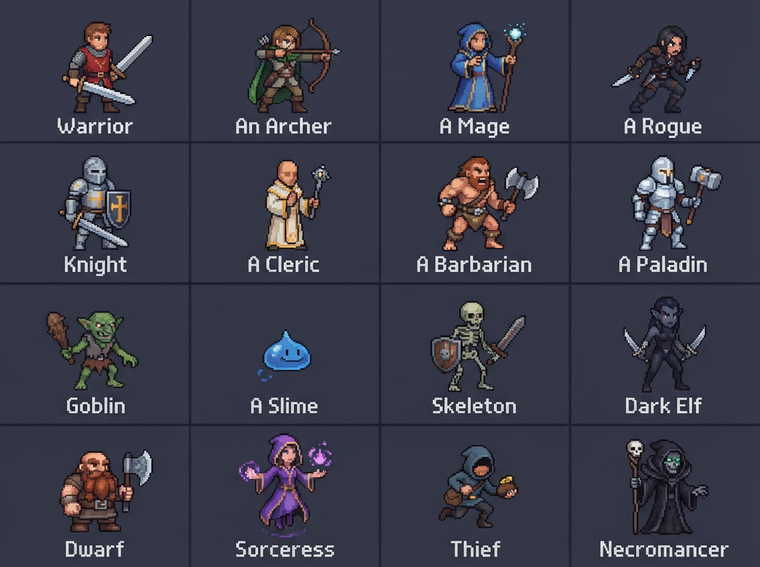
Here is the closing argument. A free pack is excellent at supplying a role. It gives you a generic goblin, a generic crate, a generic slime. It gives you something to put in the level so you can test whether the level works.
It does not give you the character your game needs. Your game needs a specific silhouette, a specific palette that matches the environment set you already committed to, a specific animation list — idle, walk, run, jump with a distinct apex frame, hurt, death, and a four-frame attack that lines up with your hitbox timing. No free pack matches that list, and the packs that come closest are the ones with the most restrictive licences.
The adaptation cost is real
Adapting a free pack means recolouring to your palette, which means matching every ramp by hand. It means adding the two animations the pack omits, which means matching the original artist's line weight and shading at a scale where nobody matches anybody. It means authoring frames in the same grid, which means discovering that the pack's grid is not perfectly aligned after all. By the time you have done it, you have paid more hours than generating the set would have cost.
When to generate a matching set instead
If you need more than one character who must look like they belong to the same world, generate the set. Agent Sprite Forge produces a consistent character sheet from a description: same palette, same cell size, same anchor, same animation list for every character in the cast. You get a set that was authored together rather than assembled from four sources with four licences and four attribution lines.
The same reasoning applies to props and tiles. The Neta Studio resource library covers the generic cases so you do not spend a week on a crate. When you need the specific thing — the character who carries your game's identity — generate it, and spend the licence-reading hour on something else.
Conclusion
Free sprite assets where to find and licence is a search problem wrapped around a permissions problem. Separate the five axes, check each in under a minute, read the licence file inside the archive rather than the store page, and check the redistribution clause before you plan to reuse anything. Then check the grid, the alpha, and the anchor, because a pack that is legally clean and geometrically inconsistent will still cost you a week.
Take the free pack for the role it fills. Generate the character.
Keep going
Make the world it walks in
A sprite is a character with nowhere to stand. Every world on the 3D game builder was made from one written description and published as a page you can play.