

What Text-to-3D Can Actually Do in 2026 (and What It Can't)
What text to 3d can actually do, stated without framing: it returns a plausible silhouette, a mid-to-low-poly mesh, a base colour, and a fast way to find out whether a shape is worth pursuing. That is the complete list. The things people assume are coming next — clean topology, exact real-world dimensions, production UVs, a working rig — are not waiting on a better model. They are decisions that get made and spent during generation. No amount of post-processing puts them back, because there is nothing left to recover.
This is not a complaint about the tooling. It is the reason the tooling is useful. Once you know which four properties you reliably get, you stop evaluating generated meshes against criteria they were never built to satisfy, and you start placing them in the pipeline where those four properties are sufficient. Neta Studio's 3D game builder is built around that placement, and so is everything below.
The Four Things the Pass Reliably Produces
A plausible silhouette. The outer outline reads. Conditioning on the prompt is strongest at the boundary between object and background, so the shape you asked for is the shape you get, at least from the direction the model was thinking about.
A mid-to-low-poly mesh. Typically a triangulated shell, decimated to whatever target the pipeline picks. For a prop that lands somewhere in the low thousands to low tens of thousands of triangles. Smooth-shaded vertex normals by default. Single-sided, usually watertight-ish at the front, less so at the back.
A base colour. A baked albedo, either as a 1k or 2k texture atlas or as vertex colours on the lowest tier. It matches the silhouette's material story: wood looks like wood, rust looks like rust.
Cheap iteration. This is the one people undervalue. Generating eight candidates takes minutes. Modelling eight candidates takes days. Even if you throw away seven, the eighth costs you almost nothing, and that changes how early you commit to a shape.
Everything else is a coin flip. The table below is the honest split.
Property | Reliable from the pass? | Why |
|---|---|---|
Outer silhouette | Yes | Strongest conditioning signal |
Triangulated mesh | Yes | Any isosurface or token output triangulates |
Base colour / albedo | Yes | Painted in the same pass |
Shape exploration speed | Yes | No manual modelling per candidate |
Clean quad topology | No | Decided by extraction or token order |
Metric dimensions | No | The prompt has no units |
Production UVs | No | A byproduct of the bake projection |
Rig and skin weights | No | Requires symmetry and edge loops that don't exist |
Legible text or logos | No | Glyphs are not in the output distribution |
Thin features (rails, chains, antennae) | Unreliable | Below the resolution of the extraction grid |
What Text to 3D Can Actually Do: Silhouette First, Everything Else Later
The human visual system reads outline, value, and hue before it reads anything else. At a distance where a prop occupies a small fraction of the viewport, fine geometry contributes almost nothing to recognition. A crate reads as a crate because of its proportions and its colour, not because each plank has a bevel.
This is the entire argument for generated assets. If the silhouette and the base colour are correct, the asset reads correctly at gameplay distance. The moment the camera gets close enough that the viewer can resolve individual faces, the argument collapses, because at that distance they can see that the topology is a triangle soup and the UV seams are wherever the packer felt like putting them.
So the useful question is never "is this mesh good?" It is "how close does the camera get?" Three metres with a walk speed of a few metres per second is a different budget from three centimetres in an inspection view. Generated meshes belong on one side of that line. Manual work belongs on the other.
Why Topology and UVs Are Baked at Generation Time
These two get lumped together as "quality issues that models will solve." They aren't quality issues. They are artifacts of two different processes that both run before you ever see the file.
Topology is a property of the extraction method
A generated mesh typically comes out of one of two paths: an isosurface extraction over a learned density field, or a sequential token prediction over a mesh representation. In the first case, the triangle order follows the voxel or octree grid that was marched. In the second, it follows the token ordering the model learned.
Neither path has any concept of an edge loop running around a knee. Neither knows that a pole at the shoulder is a problem. There is no quadrangulation step, and the triangles you get are not hiding an underlying quad structure — there isn't one.
You can run a quad remesher afterwards. Tools like Instant Meshes, QuadriFlow, or ZRemesher will produce quads. What they produce is uniform-density quads that follow curvature, not deformation. That is fine for sculpting and wrong for skinning, because the density doesn't concentrate where a joint bends. A retopology pass that actually supports animation is a manual, judgement-heavy job, and it costs about what modelling the asset from scratch would have cost. That's not a gap in the model. It's the wrong tool for the job.
UVs are a byproduct of the bake
The texture was painted in 3D. The generator projected colour onto the surface using triplanar blending, view-dependent projection, or per-face baking, and then the result was packed into an atlas. The UV set is downstream of that decision.
That has three consequences. Texel density varies across the mesh, because the projection didn't care about consistency. Islands get packed with minimal or no padding, which means mip-mapping produces bleed at seams. And the seams themselves land wherever the packer found room, which is rarely along a natural silhouette edge.
If you ever want to fix the UVs, understand that you cannot fix them in place. Re-unwrapping means re-baking, and re-baking means projecting the existing texture onto a new layout. The moment you re-unwrap, you are not editing the asset — you are translating it, and every translation loses a little. Keep the UVs you were given, or plan on repainting.
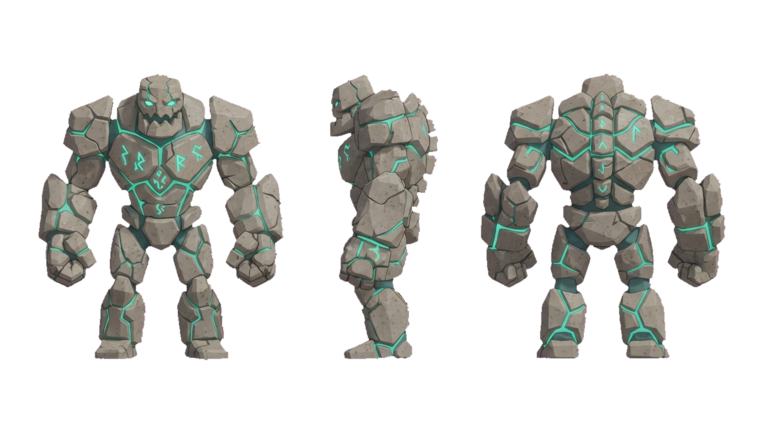
Dimensions and Rigging: Also Properties of the Output
Real-world scale is the failure that surprises people most, because it looks like something you can just correct with a number field.
Prompts have no units. "A wooden shipping crate" is a 40 cm box or a 2 m container, and the model has no way to know which one you meant. Most pipelines normalize their output into a unit cube or unit sphere, and that normalization survives export. glTF 2.0 defines linear distances in meters, so a normalized mesh arrives at roughly one metre across regardless of what it depicts. A crate and a cathedral import at the same size.
Never trust the import scale. Drop the mesh next to a one-metre reference cube or your player capsule and look at it. Set the scale factor once, apply it, and move on. The failure mode isn't that the number is wrong — it's that the number is plausible enough that nobody checks, and three weeks later a doorframe is 40 cm tall in a level that was built around it.
Rigging fails for the same class of reason. A skeleton needs consistent local coordinate frames, symmetric geometry across the mirror plane, and vertex density concentrated at joints. A generated mesh guarantees none of the three. Automatic riggers can place bones from a rough shape analysis, and they often do it convincingly. The skinning is where it comes apart: without an edge loop to hold the bend, the elbow collapses; without symmetry, mirrored weights can't be transferred, so the two arms deform differently. Two limbs generated in the same pass may not even share a vertex count, which makes weight mirroring impossible rather than just inaccurate.
What Text to 3D Can Actually Do in a Shipped Pipeline
Here is where the value actually is. For an asset where the camera never gets close, silhouette plus base colour plus a collision proxy is roughly the complete job. The remaining work is scale, collision, and material splits — and none of those require touching the mesh topology.
The categories that pay:
Set dressing and clutter. The small objects that make a space read as inhabited. Most of them are never interacted with and never approached.
Background architecture. Buildings across a street, structures on the far side of a valley. Silhouette and colour are the whole asset.
Rock formations and terrain features. Irregular shapes where the viewer has no reference for what "correct" looks like.
Whole scene tiers. An entire distant layer generated in one pass and merged into a single mesh.
Blockout before commitment. Generate the shape, walk around it, decide whether the level works, and only then commission or model the hero version.
Variation at volume. Ten crates, ten barrels, ten trees. Generate the set, keep the best of each, and the scene stops looking repeated without ten modelling sessions.
Scene Tiers: Where Generated Meshes Belong
Treat camera distance as the routing rule. It's more reliable than asset type, because the same barrel is a generated asset in one scene and a hand-modelled one in another.
Tier | Camera distance | Asset treatment | Generated mesh? |
|---|---|---|---|
Gameplay / interactable | 0–3 m, inspected | Authored topology, UVs, rig, LOD chain | No |
Near set dressing | 3–8 m | Scaled, collision added, possibly re-textured | Yes, with fixes |
Mid ground | 8–25 m | Silhouette and base colour only | Yes |
Backdrop | 25 m+, never approached | Silhouette, vertex colour or lightmap | Yes |
Distant / skybox | Beyond the play volume | Billboards or merged into one mesh | Yes |
The practical version of that table: anything within three metres of the player's path goes on the re-author list, and everything else is a candidate for generation. Put the generated props through THREE.InstancedMesh where they repeat, and merge static backdrop geometry with BufferGeometryUtils.mergeGeometries — draw calls, not triangle counts, are what cost you frame time in a browser.
Two Output Tiers: a .glb, or a Place You Can Walk Into
The platform offers two ways out of a generation, and they solve different problems.
A downloadable .glb. Standard glTF 2.0, meters, +Y up, right-handed. It loads in any engine that speaks the format, including Three.js via GLTFLoader. If you compress with DRACO or a KTX2 texture, remember that the receiving side needs the matching decoders wired up — DRACOLoader and KTX2Loader in Three.js — or the file will fail to load with an error that doesn't mention compression at all. Once loaded, traverse the scene and set castShadow and receiveShadow on the meshes, and check whether the material that came in is a MeshStandardMaterial with maps you can actually use. This tier is for when the asset is going somewhere else.
A place you can walk into. The scene is built directly into a world, and you spawn inside it in the browser. Mini World and The Cyclops' Island are this tier — not asset packs, but places. The advantage is that the world builder already owns the collision, the lighting, the camera, and the scale reference. Every integration problem from the first tier — wrong units, missing colliders, material slot mismatches — is a problem the builder solved before you arrived. If the asset is going to live in the same engine that generated it, that tier skips most of this article.
Agent Sprite Forge runs the same loop for sprite work, where the constraints are different again: a sprite has no topology at all, so the failure modes are silhouette and palette rather than UVs.
A Working Loop, With Numbers
1. Prompt with nouns and a size cue. "Weathered wooden shipping crate, plank construction, 1 m cube." Nouns carry more weight than adjectives; "weathered" mostly changes the albedo, not the mesh. A number in the prompt is a hint, not a measurement.
2. Generate four to eight candidates. The marginal cost per candidate is minutes. Use it.
3. Reject on silhouette at thumbnail size. Look at each candidate at roughly 128 pixels wide. If the shape doesn't read there, it won't read in a scene at gameplay distance, no matter how good the wireframe looks.
4. Flip the camera. Check the back. Check the underside. Generated geometry degrades fastest where the conditioning was weakest, and that is almost always the far side.
The back of a generated mesh is where the model guessed. Flip the camera 180 degrees before you accept anything, and again to look at the bottom face. A crate that looks convincing in a hero shot frequently has a melted rear panel that nobody notices until the player walks around it.
5. Scale against a known reference. One metre cube, player capsule, doorway. Apply the scale, don't carry it in a parent transform, or every downstream tool inherits the ambiguity.
6. Add a collision proxy. A box, a capsule, or a convex hull. Never use the render mesh as a collider — a decimated triangle soup is both slow and unreliable for collision.
7. Decide material slots now. If you need metalness and roughness driven separately from the base colour, split the mesh before you start texturing. Splitting later is a UV problem again, and you already know how those end.
8. Route by distance. Within three metres of the camera path means re-author. Beyond that means ship it.
What to Stop Asking the Model to Do
Stop asking for clean topology. Ask for a shape.
Stop asking for exact dimensions. Ask for a shape, then scale it against a reference.
Stop asking for a rigged character from a text prompt. Ask for a blockout, then retopologise by hand if the character is a hero. Auto-rigging a generated mesh produces a skeleton you can see and skinning you can't use.
Stop treating the first output as the asset. Treat it as the concept, and treat the second, third, and eighth outputs as the reason the first one was cheap.
The honest summary is this. Text-to-3D is a silhouette machine with a texture pass attached. It produces a shape you can evaluate in minutes, at a quality that holds up at distance and falls apart under inspection. Placed correctly — background props, set dressing, whole scene tiers, blockout — it removes days from a build. Placed incorrectly, as an asset pipeline for things the player will stand next to, it removes nothing, because you spend the same days in a retopology tool and you spent them later, with a deadline closer.
Keep going
- text to 3D
- the 3D model generator
- the Blender UV unwrap guide
- the GLB viewer & compressor
- Rainy Corner Store
Build the world it walks in
A character, a tile or a model is a material with nowhere to stand. Every world on the 3D game builder was made from one written description and published as a page you can play — including Mini World and The Cyclops' Island.